Synchronise iPhone with O2 Bluebook

If you’re an O2 customer you can setup your iPhone to synchronise or backup contacts to the O2 Bluebook service. If you have not registered for O2 Bluebook yet, go to http://bluebook.o2.co.uk/ and follow the joining instructions.

Once registered, login and click on Contacts and then “Set up a phone”. The iPhone model won’t be listed so choose another device such as the Nokia N95.
Screenshot

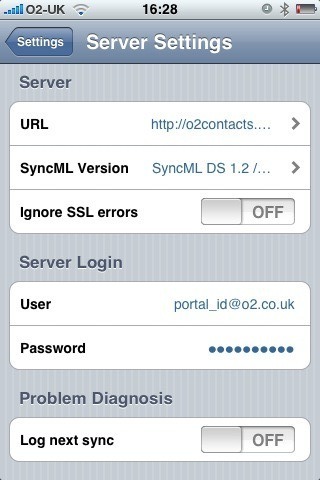
Next download and install the free Synthesis SyncML Client for iPhone from Apple’s App Store and configure it with the following settings:

Server URL: http://o2contacts.o2.co.uk/syncml

SyncML Version: SyncML DS 1.2

User: your_o2_portal_username@o2.co.uk

Password: your_o2_portal_password

Tap on ‘Start Synchronisation’ and marvel as your contacts go whizzing around the ether and appear like magic in your Bluebook account.

Follow-up:

You may see an “Access denied” error message the first time you attempt to synchronise. It seems to resolve itself if you try again with the same settings.

For the first sync I recommend that you ‘push’ your iPhone contacts to the server:

Settings > Contacts > Sync Mode > Update Server

Known issues:

  • Bluebook doesn’t support the ‘Company’ field and so contacts that only have the ‘Company’ field populated (no First or Last name) will appear as “(no name)” in the Bluebook contacts list
  • It is not possible to select a single contact group, so all contacts are synchronised
  • Contact photos are not synchronised from the iPhone

Mac OS X 10.5.5 software update killed my MacBook

Having read of the security and performance issues that have been addressed in Mac OS X 10.5.5 I launched Software Update and proceeded to upgrade my MacBook from 10.5.4 to 10.5.5.

After the update and subsequent reboot my MacBook was sluggish and unresponsive. iTunes took forever to do anything and the spinning wheel was more evident than usual. I eventually managed to close iTunes and rebooted again just in case.

Big mistake!

The machine now refuses to boot up at all and shows just a flashing question mark icon. I found a relevant Apple Support article – A flashing question mark appears when you start your Mac – and followed the suggestions therein.

I booted from a Leopard DVD and loaded Disk Utility. At first it did not recognise my SATA disk, so I tried resetting the parameter RAM (PRAM). After the next reboot Disk Utility could now see my disk, but the ‘Repair Disk’ command resulted in the following error:

Verify and Repair volume “Macintosh HD”

Checking Journaled HFS Plus volume.

Invalid B-tree node size

Volume check failed.

Error: Filesystem verify or repair failed.

After a couple of attempts at this I gave up. I tried the disk in another MacBook and the same flashing question mark appears, so it looks like the disk is kaput.

Can this just be a total coincidence that a disk that has been working fine for the last year has suddenly developed a catastrophic hardware failure within minutes of updating to 10.5.5 ?

iPhone User-Agent Headers

iPhone application User-Agent headers for 2.1 (5F136) build:

Safari

Mozilla/5.0 (iPhone; U; CPU iPhone OS 2_1 like Mac OS X; en-us) AppleWebKit/525.18.1 (KHTML, like Gecko) Version/3.1.1 Mobile/5F136

QuickTime

Apple iPhone OS v2.1 CoreMedia v1.0.0.5F136

YouTube

Apple iPhone v2.1 YouTube v1.0.0.5F136