If you’re an O2 customer you can setup your iPhone to synchronise or backup contacts to the O2 Bluebook service. If you have not registered for O2 Bluebook yet, go to http://bluebook.o2.co.uk/ and follow the joining instructions.
Once registered, login and click on Contacts and then “Set up a phone”. The iPhone model won’t be listed so choose another device such as the Nokia N95.
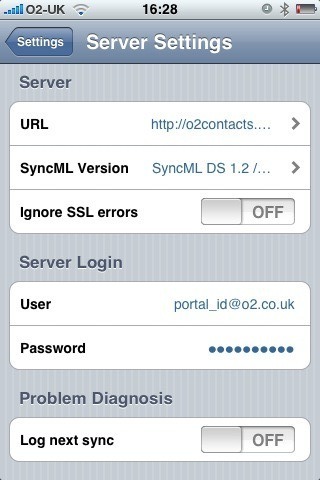
Next download and install the free Synthesis SyncML Client for iPhone from Apple’s App Store and configure it with the following settings:
Server URL: http://o2contacts.o2.co.uk/syncml
SyncML Version: SyncML DS 1.2
User: your_o2_portal_username@o2.co.uk
Password: your_o2_portal_password
Tap on ‘Start Synchronisation’ and marvel as your contacts go whizzing around the ether and appear like magic in your Bluebook account.
Follow-up:
You may see an “Access denied” error message the first time you attempt to synchronise. It seems to resolve itself if you try again with the same settings.
For the first sync I recommend that you ‘push’ your iPhone contacts to the server:
Settings > Contacts > Sync Mode > Update Server
Known issues:
- Bluebook doesn’t support the ‘Company’ field and so contacts that only have the ‘Company’ field populated (no First or Last name) will appear as “(no name)” in the Bluebook contacts list
- It is not possible to select a single contact group, so all contacts are synchronised
- Contact photos are not synchronised from the iPhone
 WebDiary.com