Migrating from RAID1 to RAID5

There comes a time when RAID1 outlives its usefulness and it’s time to ‘upgrade’ to the more expandable RAID5. So what’s the simplest way of migrating existing RAID1 partitions to RAID5? Well it’s actually less painful than you might think.

As ever please backup any critical data to a separate drive before you undertake this. I have performed this on a Fedora 12 system and it completed without a hitch, but YMMV!

I recommend that you boot from a Fedora rescue disc so you’re not doing this on a ‘live’ system, then drop to the command prompt shell and follow these instructions:

Stop the existing RAID array:
# mdadm --stop /dev/md0

Create the new RAID5 array (cat /proc/mdstat to check on rebuild progress):
# mdadm --create /dev/md0 --level=5 -n 2 /dev/sda2 /dev/sdb2

Add an additional disk to the new RAID5 array:
# mdadm --add /dev/md0 /dev/sdc2

Now grow the partition to include the extra disk (again cat /proc/mdstat to check progress). This make take several hours depending on the size of the partition. The backup file can be used to restore data in the event of a system crash and should be stored on a separate device.
# mdadm --grow /dev/md0 --raid-disks=3 --backup-file=/mnt/ext/raid5.bak

Perform an integrity check on the new RAID filesystem:
# e2fsck -f /dev/md0

Then resize the partition to include the extra disk space:
# resize2fs -p /dev/md0

Add the new RAID configuration to mdadm.conf and create a new ramdisk image:
# chroot /mnt/sysimage
# mdadm --examine --scan | grep md0 >>/etc/mdadm.conf
# dracut -f /boot/initramfs-$(uname -r).img $(uname -r)

Splitting a Matroska (MKV) file

Looking for a quick command line solution to extract a specific section of video clip from a mkv (Matroska) file? Well look no further, mkvmerge can do this and more.

Using mkvmerge you can split a mkv file between specific timecodes to extract a timed video clip, for example to extract a 30 minute clip which starts 70 minutes into the source file:

mkvmerge --out outfile.mkv --video-tracks 1 --audio-tracks 2 --no-subtitles --no-attachments infile.mkv --split timecodes:01:10:00,01:40:00 --split-max-files 3

or put more succinctly:

mkvmerge -o outfile.mkv -d 1 -a 2 -S -M infile.mkv --split timecodes:01:10:00,01:40:00 --split-max-files 3

The above command will split the source infile.mkv into three new output files. The command line arguments specify using video track 1, audio track 2, and the removal of any subtitles or attachments.

The first outfile will contain the first 70 minutes, the second will contain the next 30 minutes (the segment you want) and the last outfile will contain the remainder of the file.

Easy when you know how 😀

Maplin / Nikkai A13JG DVD Player with Integrated Freeview

I was in the market for a combined DVD and Freeview unit with HD upscaling and HDMI output and the A13JG from Maplin seemed to fit the bill. At time of writing it is on sale at Maplin for just shy of £50.

A13JG

First impression on unboxing: It is cheap and nasty tat.

Second impression: My first impression was correct.

Despite my having an excellent roof mounted antenna which a Humax Freeview box shows as having 70% signal strength and 100% signal quality, the A13JG failed to maintain a consistent Freeview picture. When it did occasionally manage to display a picture the audio and video were out of sync (even worse when using 60 Hz mode).

The remote control looks and feels cheap (which it is I guess), the controls are complicated and the EPG is totally incomprehensible. I didn’t even get as far as testing out the DVD functions as there was no way I was going to keep it.

Perhaps I should have read the reviews first…

David (26/11/2009)

Unusable for freeview. After about 20-25 minutes the picture freezes. Sometimes more often – only seconds after changing channel up/down or power-cycle.

I returned to Maplin the very next day and was fortunately able to persuade them to refund me, although for all they knew I was returning a brick as they didn’t even open the box to check.

In summary, don’t even think about it.

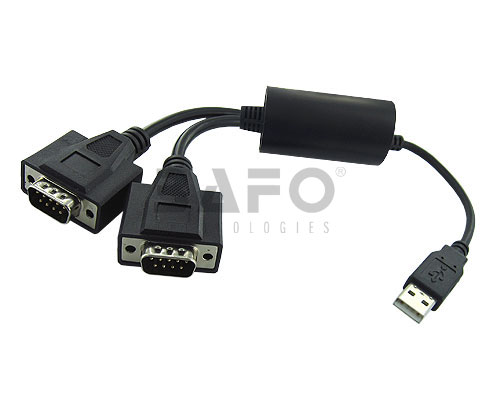
Maplin USB to Twin Serial Port Adapter N04GF

Confirmation that the Maplin USB to Serial (DB-9) two port adapter (Order Code N04GF) is detected by Fedora 12 and works perfectly. The packaging also has the product code BF-816 which reveals that the adapter is actually a BAFO Technologies product, which uses the MosChip MCS7720 controller (driver downloads here).

BAFO BF-816

Kernel output below:

usb 5-2: new full speed USB device using ohci_hcd and address 3
usb 5-2: New USB device found, idVendor=9710, idProduct=7720
usb 5-2: New USB device strings: Mfr=0, Product=0, SerialNumber=0
usb 5-2: configuration #1 chosen from 1 choice
USB Serial support registered for Moschip 2 port adapter
mos7720: 1.0.0.4F:Moschip USB Serial Driver
moschip7720 5-2:1.0: Moschip 2 port adapter converter detected
usb 5-2: Moschip 2 port adapter converter now attached to ttyUSB0
usb 5-2: Moschip 2 port adapter converter now attached to ttyUSB1
usbcore: registered new interface driver moschip7720

Currently on sale at Maplin for £15 (until 26/01/2010)