Corrupted SMS on Android

For a couple of weeks I have been receiving strangely composed SMS from a friend. It was as if two totally separate conversations were being mixed together into one long message.

At first I thought my friend might have been inebriated when he sent them (not unusual for him!) but as the messages continued to come through in this strange fashion I wondered if perhaps he was suffering from a split-personality.

Eventually I called him up and we compared messages. It turned out that the messages I was receiving on my Android device bore little resemblance to the messages he was sending. At first I thought this could be due to a corrupt SMS database on his iPhone, but after some searching I came across an Android bug report which perfectly described the issue I was experiencing:

» Issue 17769: Multipart SMS getting mixed up with old messages

The first post on this thread is dated June 2011, so the problem has been around for quite a while! I was pleased that I wasn’t alone in experiencing the issue, but what was the cause and how could I fix it?

Another Android bug report – Issue 28697 – had the answers:

Under certain circumstances, SMSDispatcher can incorrectly construct multi-part SMS messages, resulting in a corrupted message being dispatched to the applications. The corrupted message contains parts from previously received multi-part SMS messages instead of the corresponding parts from the newly received message.

In this more recent report, the author Ian Payton has identified the problem to be partly due to the way in which multi-part SMS is implemented, and partly to how Android processes multi-part messages.

If you want all the details then head on over to Ian’s detailed explanation, but the quick version is that an Android device can sometimes end up with orphaned SMS which it doesn’t know what to do with. These are usually the result of a message being retransmitted by the network because it did not receive a delivery acknowledgement from your device. This can occur if you are in patchy cellular coverage for example.

The SMS protocol uses an internal reference number to help reassemble a concatenated message, but this reference is not unique and if you have one or more of these orphaned messages on your device then in some circumstances the message parts can get mixed up to erroneously construct a new Frankenmessage!

This has the effect of your being presented with a message which is made up of some of the new message and some of an old message which has been hanging around in limbo on your device.

That’s all very well, but how can you fix this situation?

Ian has kindly written SMS Multi-Part Cleaner, a small Android application which finds all the orphaned SMS on your device and allows you to review and delete them manually. Alternatively you can download the very similar Orphaned Texts app from Google Play.

If you are prone to patchy cellular coverage and frequently receive long SMS then you be advised to run this application every few weeks to check for orphaned messages.

Printing to a Samsung ML-1210 on Mac OS X

Although Samsung stopped providing official Mac OS drivers for the ML-1210 laser printer long ago, it is still possible to use this venerable old laser printer with the latest Mac OS X.

First download the latest Open Source Samsung-GDI for Mac OS X and GPL Ghostscript for Mac OS X packages from The Linux Foundation.

Next you’ll need the Foomatic-RIP package, but don’t download the latest version!

You need to use Foomatic-RIP version 3.0.2 (dated 30th January 2008), otherwise your print-outs will include a top margin which you can’t remove. Fortunately the older working version is still available from OpenPrinting.org.

Open each downloaded disk image in turn and run the installers. When all three packages have been installed you are ready to add the printer.

Connect your printer using an appropriate USB cable. Now go to Mac OS X System Preferences and select ‘Print & Scan’. Click on the ‘+’ button and a new ‘Add Printer’ window will open.

Assuming your printer is connected you should see ‘Samsung ML-1210’ already in the printer window. Click on that printer name and then open the drop-down list of printer drivers next to “Print Using”. Select ‘Samsung ML-1210 Foomatic/GDI’ and then the ‘Add’ button.

Your printer has been added. Legacy printer revival achievement unlocked!

Gmail attachments not working?

I’m assuming you’ve found your way here because you too are having difficulty viewing image attachments in the Gmail app for Android?

I found that thumbnail previews of images were displaying fine, but when I tapped to view the full image the progress bar would scroll around indefinitely.

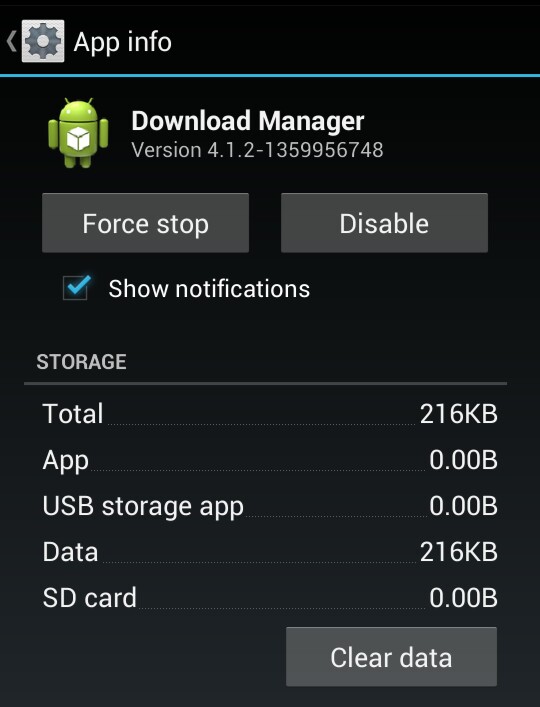
In my case the problem was caused by Android’s Download Manager, and the solution was relatively simple.

Go into your Android Settings screen, select Apps, swipe to the ALL tab and scroll down to Download Manager.

Tap on Download Manager and then Clear data.

Download Manager

Exit the settings, go back into Gmail and hopefully you should now find that attachments are working again.

The Mac App Store’s Dirty Little Secret

appstore_download

Apple’s Mac App Store is promoted as a simple solution for installing and managing third party apps on your Mac. On the face of it this would indeed appear to be true, but The Mac App Store is hiding a dirty little secret!

Apple makes some grand claims on their web site:

Thousands of apps. One simple way to get them.

With the Mac App Store built into OS X Lion, getting the apps you want has never been easier. No more boxes, no more discs, no more time-consuming installation. Click once to download and install any app on your Mac.

Keep your apps up to date.

Since developers are constantly improving their apps, the Mac App Store keeps track of your apps and tells you when an update is available. Update one app at a time or all of them at once, and you’ll always have the latest version of every app you own.

That sounds wonderful – but it’s a lie!

Some developers aren’t happy with providing free app updates to existing customers, so they publish updates as a discrete new app. This means that existing customers aren’t able to receive the update without purchasing the app all over again. Even worse the developer sometimes removes the legacy app from the App Store entirely, so it’s not available if you want to re-install it.

Buy, download and even re-download.

You can install apps on every Mac authorised for your personal use, and even download them again. This is especially convenient when you buy a new Mac and want to load it with apps you already own.

Again, not true!

If a developer decides to withdraw an application that you previously purchased from the App Store then it’s gone and there is no mechanism to download it again.

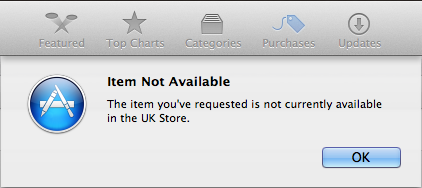
Not Available

I discovered this anomaly after I tried to install an app that I ‘owned’ onto a new Mac. After a bit of head scratching it was apparent that the developer had published a new version of the app just a few months after my purchase. Since I couldn’t re-download my purchased app I took it up with Apple Customer Support..

This is their email response:

I certainly understand how recent difficulties might have been frustrating for you. If I were in your situation, I would definitely feel the same way.

We do want that your experience with iTunes to be pleasant, however, I regret to inform you that your request has been denied. In accordance with the iTunes Store Terms of Sale that you agreed to when you created your iTunes Store account, all sales on the iTunes Store are final. This policy matches Apple’s refund policies and provides protection for copyrighted materials.

Please review the iTunes Store Terms of Sale for more information:
http://www.apple.com/legal/itunes/ww

As mentioned earlier, the iTunes Store is not responsible for the loss of purchases and encourages customers to back up their hard disks regularly. If an item needs to be replaced, you can restore your purchases from the backup and avoid the need to purchase replacement copies of titles from your collection.

Additionally, please make back up copies of your new purchases on a regular basis.

Apple’s recommendation then is that you keep a backup of your purchases! This contradicts The Mac App Store’s advertised capability of facilitating the re-download of apps you already own.

To conclude their email Apple went on to firmly slam the door in my face:

Again, I apologize for any inconvenience you have experienced. Any additional emails from you regarding this issue will not receive a response from iTunes Store Customer Support. Thank you for understanding.

That was not the response I was expecting from Apple’s renowned customer service.

What value are Apple adding to justify taking 30% of the sale price? Not much in my opinion. They aren’t future-proofing your purchases and in my experience their customer support isn’t great either. If you’re given the choice, my advice is to purchase apps direct from the developer instead.