Maplin USB to Twin Serial Port Adapter N04GF

Confirmation that the Maplin USB to Serial (DB-9) two port adapter (Order Code N04GF) is detected by Fedora 12 and works perfectly. The packaging also has the product code BF-816 which reveals that the adapter is actually a BAFO Technologies product, which uses the MosChip MCS7720 controller (driver downloads here).
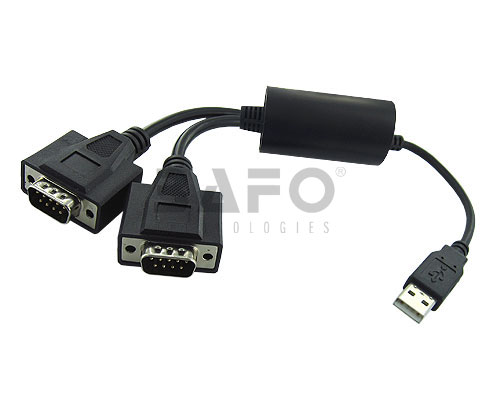
BAFO BF-816

Kernel output below:

usb 5-2: new full speed USB device using ohci_hcd and address 3
usb 5-2: New USB device found, idVendor=9710, idProduct=7720
usb 5-2: New USB device strings: Mfr=0, Product=0, SerialNumber=0
usb 5-2: configuration #1 chosen from 1 choice
USB Serial support registered for Moschip 2 port adapter
mos7720: 1.0.0.4F:Moschip USB Serial Driver
moschip7720 5-2:1.0: Moschip 2 port adapter converter detected
usb 5-2: Moschip 2 port adapter converter now attached to ttyUSB0
usb 5-2: Moschip 2 port adapter converter now attached to ttyUSB1
usbcore: registered new interface driver moschip7720

Currently on sale at Maplin for £15 (until 26/01/2010)

Upgrading Fedora 10 to Fedora 12 (F10 to F12)

Yes, it is possible to upgrade straight from Fedora 10 to Fedora 12, thereby skipping the dreaded Fedora 11. It wasn’t exactly plain sailing, so here are the steps I went through.

First of all I had to free up all available space on my /boot partition. I cleaned out all old kernels and followed the instructions in ‘not enough space in /boot’ but the Fedora 12 installer apparently requires 26MB of free space in /boot and I had still not freed up quite enough.

I found some extra space by using the following command:

# tune2fs -r 0 /dev/md1

This set the number of reserved filesystem blocks on my /boot partition to zero and gave me around 30MB to play with.

Next for the upgrade itself and for this I used preupgrade (‘yum install preupgrade‘ if you don’t already have preupgrade installed).

# preupgrade-cli "Fedora 12 (Constantine)"

After the F12 packages had been downloaded the system was ready for a reboot.

The upgrade process itself went without any problems, however attempting to boot with Fedora 12 failed with: “Kernel panic – not syncing: VFS: Unable to mount root fs on unknown-block(0,0)”

I tried various suggested fixes for this but in the end had to build a new initramfs image. To do this I booted into Rescue mode using the Fedora 12 DVD and then after dropping to a shell:

# chroot /mnt/sysimage
# dracut -f /boot/initramfs-$(uname -r).img $(uname -r)

One more reboot and I was finally up and running with Fedora 12.

Slow USB transfer speeds on Fedora 10

Are you suffering from slow transfer speeds when copying files to a USB hard drive? Read on as this may be of some help.

I was experiencing very slow throughput when copying large files to a Western Digital Passport drive connected to a Shuttle SA76G2 running Fedora 10.

Using the command ‘lsusb’ you can see all the USB devices that are present on your system, e.g.

$ /sbin/lsusb | sort -n

Bus 001 Device 001: ID 1d6b:0002 Linux Foundation 2.0 root hub
Bus 002 Device 001: ID 1d6b:0002 Linux Foundation 2.0 root hub
Bus 002 Device 005: ID 1058:070a Western Digital Technologies, Inc.
Bus 003 Device 001: ID 1d6b:0001 Linux Foundation 1.1 root hub
Bus 004 Device 001: ID 1d6b:0001 Linux Foundation 1.1 root hub
Bus 005 Device 001: ID 1d6b:0001 Linux Foundation 1.1 root hub
Bus 005 Device 002: ID 067b:2303 Prolific Technology, Inc. PL2303 Serial Port
Bus 006 Device 001: ID 1d6b:0001 Linux Foundation 1.1 root hub
Bus 007 Device 001: ID 1d6b:0001 Linux Foundation 1.1 root hub

The above output shows that there are seven USB root hubs available on my system, but only two of these support the high-speed USB 2.0 protocol. In order to benefit from high-speed data throughput the external USB disk needs to be connected to a bus with a 2.0 root hub. It also helps if you attach one device per bus so they do not share bus bandwidth.

The Shuttle SA76G2 specs claim that all the USB ports are 2.0 compliant, but ‘lsusb’ reveals that Fedora 10 detects only two 2.0 root hubs. After moving the external drive between the physical USB ports I identified a port which was attached to a 2.0 root hub and since then data throughput has been excellent.