1&1 and .ME (Montenegro) domains

I am the proud owner of a shiny new .ME domain name which I have been attempting to use with my 1&1 hosting account. 1&1 resolutely refuse to accept however that .ME is a valid top-level domain and their domain tools reject the name with “Invalid domain name. Please include a top level domain (TLD).

Contacting 1&1 support about this issue has been fruitless. I first contacted them back in July 2008 and their response was:

As much as we would want to cater most TLDs, so far, .me TLD is not yet
supported by 1&1. Our admins will be informing our customers when we
are going to support .me TLD.

Two months later it was a different excuse:

Unfortunately, there is a bug preventing you from adding .me domains to
your account. Once we have a resolution for the error, we will contact
you. We apologize for the delay.

More recently the response was:

I understand that you wish to use .me domain name with your hosting
package.  We currently working on resolving this matter regarding the
.me domain name.  I apologize for the time it is taking.  We appreciate
your patience in this matter.

Well the “bug” is still there and I still can’t add my .ME domain to my account.

If you have stumbled across this post because you are experiencing the same frustration, please add a comment and when I have collected enough I will send the link to 1&1.

UPDATE 01/04/2009: No this isn’t an April Fool joke – having just checked again today I see that the 1&1 control panel does now accept .me domain names!
Synchronise iPhone with O2 Bluebook

If you’re an O2 customer you can setup your iPhone to synchronise or backup contacts to the O2 Bluebook service. If you have not registered for O2 Bluebook yet, go to http://bluebook.o2.co.uk/ and follow the joining instructions.

Once registered, login and click on Contacts and then “Set up a phone”. The iPhone model won’t be listed so choose another device such as the Nokia N95.

Screenshot

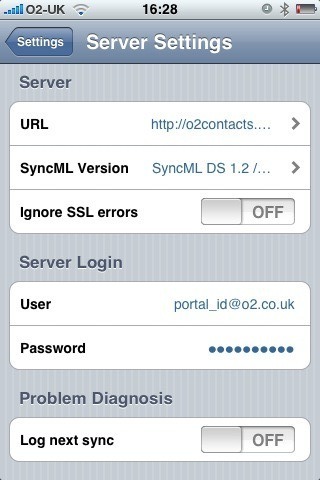
Next download and install the free Synthesis SyncML Client for iPhone from Apple’s App Store and configure it with the following settings:

Server URL: http://o2contacts.o2.co.uk/syncml

SyncML Version: SyncML DS 1.2

User: your_o2_portal_username@o2.co.uk

Password: your_o2_portal_password

Tap on ‘Start Synchronisation’ and marvel as your contacts go whizzing around the ether and appear like magic in your Bluebook account.

Follow-up:

You may see an “Access denied” error message the first time you attempt to synchronise. It seems to resolve itself if you try again with the same settings.

For the first sync I recommend that you ‘push’ your iPhone contacts to the server:

Settings > Contacts > Sync Mode > Update Server

Known issues:

  • Bluebook doesn’t support the ‘Company’ field and so contacts that only have the ‘Company’ field populated (no First or Last name) will appear as “(no name)” in the Bluebook contacts list
  • It is not possible to select a single contact group, so all contacts are synchronised
  • Contact photos are not synchronised from the iPhone

iPhone User-Agent Headers

iPhone application User-Agent headers for 2.1 (5F136) build:

Safari

Mozilla/5.0 (iPhone; U; CPU iPhone OS 2_1 like Mac OS X; en-us) AppleWebKit/525.18.1 (KHTML, like Gecko) Version/3.1.1 Mobile/5F136

QuickTime

Apple iPhone OS v2.1 CoreMedia v1.0.0.5F136

YouTube

Apple iPhone v2.1 YouTube v1.0.0.5F136

I spy on iPhone

I decided to investigate which URLs the iPhone accesses when you use the various embedded applications. To capture the requests I simply setup a Squid proxy on the same local WiFi network and configured the iPhone to proxy all network connections through it.

Below are the results:

Safari – Yahoo! Search:

GET http://m.yahoo.com/apple/onesearch?pintl=en_gb&p=foobar&pcarrier=O2+-+UK&pmcc=234&pmnc=10

(note the carrier name and network code are included in the search request)

Safari – Google Search:

GET http://www.google.co.uk/search?q=foobar&ie=UTF-8&oe=UTF-8&client=safari

Yahoo! Weather:

POST http://iphone-wu.apple.com/dgw?imei=REMOVED&apptype=weather

Yahoo! Stocks:

POST http://iphone-wu.apple.com/dgw?imei=REMOVED&apptype=finance

Google Maps:

POST http://iphone-wu.apple.com/glm/mmap
CONNECT iphone-maps.apple.com:443

iTunes Store:

GET http://phobos.apple.com/bag.xml
GET http://ax.phobos.apple.com.edgesuite.net/WebObjects/MZStore.woa/wa/storeFront
GET http://ax.phobos.apple.com.edgesuite.net/WebObjects/MZStore.woa/wa/viewTopTensList

YouTube:

GET http://iphone-wu.apple.com/feeds/standardfeeds/most_viewed?start-index=1&max-results=25&format=2,3&client=ytapi-apple-iphone&time=all_time
GET http://iphone-wu.apple.com/feeds/standardfeeds/recently_featured?start-index=1&max-results=25&format=2,3&client=ytapi-apple-iphone
GET http://img.youtube.com/vi/
CONNECT http://www.google.com:443

It is interesting to note that most traffic is proxied via Apple’s servers – anyone say single point of failure? The reference to IMEI in the Weather and Stocks requests has been discussed at length in other forums before. This is a misnomer, the reference is believed to be just a GUID.

What is more interesting (or worrying!) is the mysterious encrypted connection to http://www.google.com (SSL port 443) whenever YouTube is accessed. I wonder what data is being shared here – and why?