1&1 and .ME (Montenegro) domains

I am the proud owner of a shiny new .ME domain name which I have been attempting to use with my 1&1 hosting account. 1&1 resolutely refuse to accept however that .ME is a valid top-level domain and their domain tools reject the name with “Invalid domain name. Please include a top level domain (TLD).

Contacting 1&1 support about this issue has been fruitless. I first contacted them back in July 2008 and their response was:

As much as we would want to cater most TLDs, so far, .me TLD is not yet
supported by 1&1. Our admins will be informing our customers when we
are going to support .me TLD.

Two months later it was a different excuse:

Unfortunately, there is a bug preventing you from adding .me domains to
your account. Once we have a resolution for the error, we will contact
you. We apologize for the delay.

More recently the response was:

I understand that you wish to use .me domain name with your hosting
package.  We currently working on resolving this matter regarding the
.me domain name.  I apologize for the time it is taking.  We appreciate
your patience in this matter.

Well the “bug” is still there and I still can’t add my .ME domain to my account.

If you have stumbled across this post because you are experiencing the same frustration, please add a comment and when I have collected enough I will send the link to 1&1.

UPDATE 01/04/2009: No this isn’t an April Fool joke – having just checked again today I see that the 1&1 control panel does now accept .me domain names!

QED-uk.com and Mallplace.com spam

Well here’s an interesting thing. I registered with QED-uk.com (Miller Brothers Retail Ltd t/a Quality Electrical Direct) in July 2006 using an email address unique to that site.

Two years later I have been receiving spam emails from mallplace.com all sent to this same unique address.

Originating IP: 213.171.196.167
from: information@mallplace.com
subject: Best new website award goes to mallplace.com
Date: Tue, 23 Dec 2008 17:20:35 +0000

Originating IP: 213.171.196.167
from: information@mallplace.com
subject: Mallplace, January Sales!
Date: Fri, 26 Dec 2008 14:48:41 +0000

Originating IP: 213.171.196.167
from: information@mallplace.com
subject: mallplace.com given 5 star review by webuser magazine!
Date: Sun, 28 Dec 2008 21:26:51 +0000

So how did the mallplace.com spammers obtain my address I wonder?

The address of QED-uk.com is Miller House, Ogden Road, Doncaster, DN2 4SQ and the whois record for mallplace.com shows that the registrant is “pollock new media” of Miller House, Ogden Road, DN2 4SQ.

QED-uk.com’s web site makes this claim regarding privacy: “As a UK based company we abide by the rules and regulations of the Data Protection Acts of 1984 and 1998, and as such no information supplied to us will be given to or used by any third parties.”

Perhaps someone from Pollock New Media / Mallplace.com would care to comment on their association with Miller Brothers Retail Ltd / QED-uk.com?

UPDATE 17/12/2009

I am now receiving spam mail from ‘liGo Electronics <ichoose@ligo-electronics.com>’ to the same unique address that I used with QED-uk.com. This time they claim “You have received this email as a special customer of liGo.”

Oh really?

Synchronise iPhone with O2 Bluebook

If you’re an O2 customer you can setup your iPhone to synchronise or backup contacts to the O2 Bluebook service. If you have not registered for O2 Bluebook yet, go to http://bluebook.o2.co.uk/ and follow the joining instructions.

Once registered, login and click on Contacts and then “Set up a phone”. The iPhone model won’t be listed so choose another device such as the Nokia N95.

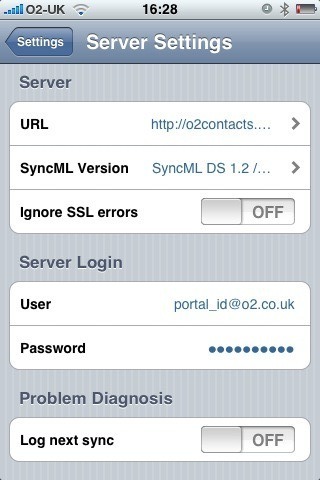
Screenshot

Next download and install the free Synthesis SyncML Client for iPhone from Apple’s App Store and configure it with the following settings:

Server URL: http://o2contacts.o2.co.uk/syncml

SyncML Version: SyncML DS 1.2

User: your_o2_portal_username@o2.co.uk

Password: your_o2_portal_password

Tap on ‘Start Synchronisation’ and marvel as your contacts go whizzing around the ether and appear like magic in your Bluebook account.

Follow-up:

You may see an “Access denied” error message the first time you attempt to synchronise. It seems to resolve itself if you try again with the same settings.

For the first sync I recommend that you ‘push’ your iPhone contacts to the server:

Settings > Contacts > Sync Mode > Update Server

Known issues:

  • Bluebook doesn’t support the ‘Company’ field and so contacts that only have the ‘Company’ field populated (no First or Last name) will appear as “(no name)” in the Bluebook contacts list
  • It is not possible to select a single contact group, so all contacts are synchronised
  • Contact photos are not synchronised from the iPhone

Mac OS X 10.5.5 software update killed my MacBook

Having read of the security and performance issues that have been addressed in Mac OS X 10.5.5 I launched Software Update and proceeded to upgrade my MacBook from 10.5.4 to 10.5.5.

After the update and subsequent reboot my MacBook was sluggish and unresponsive. iTunes took forever to do anything and the spinning wheel was more evident than usual. I eventually managed to close iTunes and rebooted again just in case.

Big mistake!

The machine now refuses to boot up at all and shows just a flashing question mark icon. I found a relevant Apple Support article – A flashing question mark appears when you start your Mac – and followed the suggestions therein.

I booted from a Leopard DVD and loaded Disk Utility. At first it did not recognise my SATA disk, so I tried resetting the parameter RAM (PRAM). After the next reboot Disk Utility could now see my disk, but the ‘Repair Disk’ command resulted in the following error:

Verify and Repair volume “Macintosh HD”

Checking Journaled HFS Plus volume.

Invalid B-tree node size

Volume check failed.

Error: Filesystem verify or repair failed.

After a couple of attempts at this I gave up. I tried the disk in another MacBook and the same flashing question mark appears, so it looks like the disk is kaput.

Can this just be a total coincidence that a disk that has been working fine for the last year has suddenly developed a catastrophic hardware failure within minutes of updating to 10.5.5 ?

iPhone User-Agent Headers

iPhone application User-Agent headers for 2.1 (5F136) build:

Safari

Mozilla/5.0 (iPhone; U; CPU iPhone OS 2_1 like Mac OS X; en-us) AppleWebKit/525.18.1 (KHTML, like Gecko) Version/3.1.1 Mobile/5F136

QuickTime

Apple iPhone OS v2.1 CoreMedia v1.0.0.5F136

YouTube

Apple iPhone v2.1 YouTube v1.0.0.5F136