GSecure: Encrypt your Google Drive

Google Drive has finally launched, but privacy campaigners have already reviewed Google’s Privacy Policy and raised questions about the legal ownership of files you store on ‘your’ G Drive.

But what Google can’t see they can’t use right? šŸ™‚

Using EncFS and some tools you can create a totally secure encrypted filesystem on top of the standard Google Drive in under 5 minutes.

Mac OS instructions only below.

First download and installĀ Fuse4XĀ and a version ofĀ EncFSĀ which uses the Fuse4X APIs. Thanks to Simone LehmannĀ for providing an EncFS Mac installer atĀ http://www.lisanet.de/?p=128Ā (alsoĀ mirrored here).

To create a new encrypted volume (stored locally at first to prevent the EncFS key from being synchronised with Google Drive):

encfs ~/Desktop/_Encrypted ~/Documents/_GSecure

Answer ā€˜yes’ when prompted to create the new folders and choose ā€˜p’ forĀ pre-configured paranoia modeĀ (256-bit AES encryption). Enter a secure EncFS password when prompted and you’re done.

Now the filesystem has been created we can deal with securing the key.

umount ~/Documents/_GSecure
mkdir ~/.keys
mv ~/Desktop/_Encrypted/.encfs6.xml ~/.keys/gsecure.xml

The commands above move your key from the EncFS filesystem into a hidden folder in your (local) home directory

Now move the entireĀ ~/Desktop/_EncryptedĀ folder (minus your key) into your Google Drive:

mv ~/Desktop/_Encrypted ~/Google\ Drive/

Finally download my GSecureĀ application and copy it to your Applications folder.

The first time you run GSecure it will prompt you for your EncFS password which it stores in your local login keychain. The password must match the secure password you set in a previous step.

To mount or unmount the encrypted filesystem simply run the GSecure app. For convenience copy it to your Mac OS Dock for quick access.

Hapless Harry

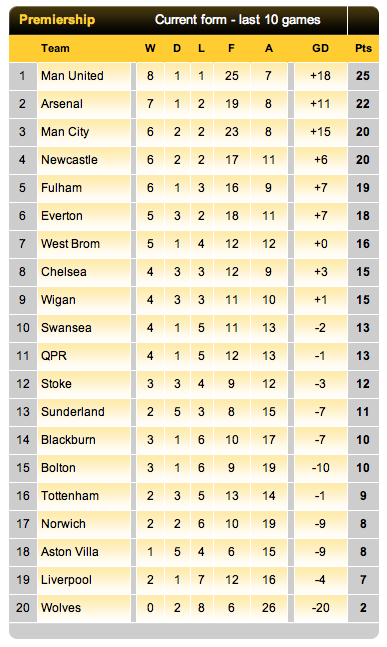
In the ten game spell since Fabio Capello quit as England football manager, Spurs have won just 2 games, drawn 3 and lost 5. We were also thrashed in the North London derby and humiliated in a 5-1 FA Cup semi-final defeat at Wembley against Chelsea.

That current league form ranks Spurs in 16th place, a point behind Blackburn and Bolton who coincidentally are the next two teams we face.

Table courtesy of weekendfootball.co.uk

On that form it’s going to be a real challenge to make 5th place, let alone 4th.

What does England manager-elect Redknapp have to say in his defence?

After losing 2-1 to Norwich:

“Well all credit to them. I thought they deserved it, they worked very hard today and made it difficult for us. They played excellent. We were disappointing. I changed the system, I played 4-4-2 today, we played with four forwards and I really felt we were too open. We’ve got five big games to go, we’ve got to really look to win all five games.”

You might think that as manager he was actually responsible for the formation and tactics and could perhaps make changes if it wasn’t working?

After losing 1-0 to QPR:

“There’s four games left, we’ve got to win the last four games now. I think you’re gonna need 12 points now, you’re going to have to pick up 12 points from the last four games. It’s going to be tight, it’s all to play for. Four games to go, we need four wins.”

“We need to win x games”. That seems to be a recurring quote from Harry.

You don’t need to be a master tactician or even a mathematician to work that one out.

Fortunately The FA are all set to come to the rescue and pay to ‘release’ Harry before he suffers the ignominy of a sacking. So it’sĀ ‘Harry for England’ and COME ON YOU SPURS!

iPhone MMS settings for O2-UK

Do you use an iPhone on the O2-UK network and find that you can no longer send or receive MMS sinceĀ the last iPhone software update?

It seems that Apple’s carrier bundle settings for O2-UK don’t recognise that some O2 customers aren’t on official iPhone tariffs and so need different MMS settings to the default.

Below are the O2 MMS settings that you should use if you are not on an official iPhone tariff. For example you might be fortunate enough to still be on a Simplicity tariff with unlimited data.

Settings > General > Network > Cellular Data Network > MMS

APN wap.o2.co.uk
Username o2wap
Password password
MMSC http://mmsc.mms.o2.co.uk:8002
MMS Proxy 82.132.254.1:8080
MMS Max Message Size 307200
MMS UA Prof URL (leave blank)

Switch your iPhone off and on again after making these changes and MMS should be fully restored.

Insomniac Mac

Since upgrading to Mac OS Lion I have been unable to persuade our ageing MacBook to go to sleep when it’s supposed to. The OS X Energy Saver preferences were set correctly, but it would not sleep of its own accord. Putting it to sleep manually worked, but the computer sleep idle timer was just ignored.

I put this down to a quirk of the older hardware and worked around it by defining a nightly sleep schedule, but when our shiny new iMac did exactly the same I knew there must be an application overriding the defaultĀ behaviour.

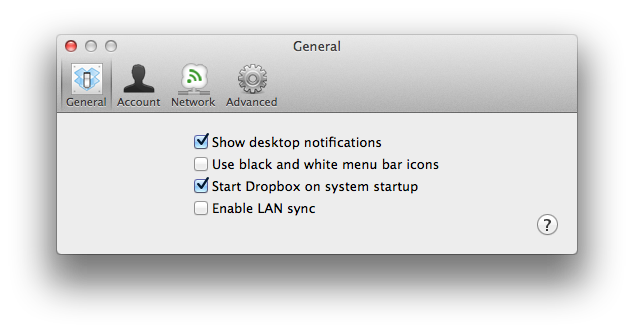
Sure enough after a morning of trial and error and eliminating all the other options, I finally discovered the culprit to be Dropbox LAN sync.

If Dropbox LAN sync is enabled then the Mac won’t put itself to sleep. The mystery is finally solved!

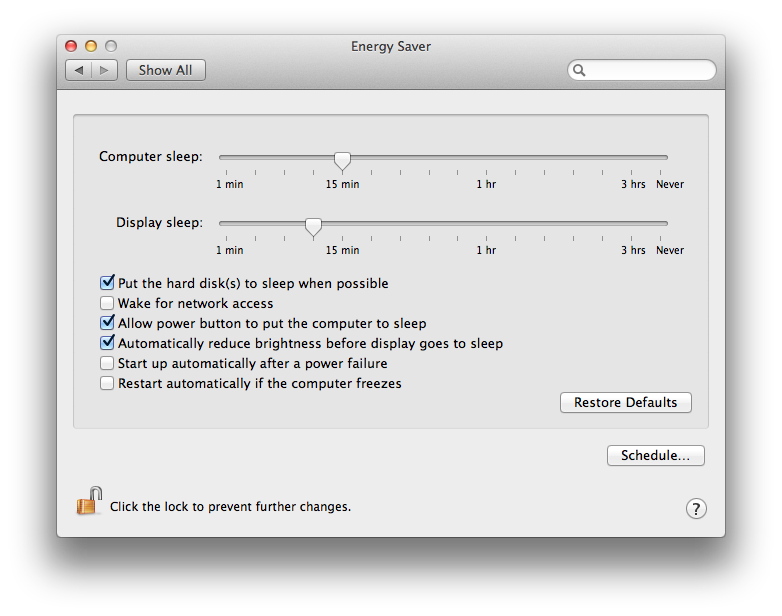
If you’ve disabled Dropbox LAN sync and your Mac is still powering on periodically (like every hour), then make sure you have also unchecked ‘Wake for network access’ in the Energy Saver preferences.

(Note: Mac OS X 10.7.3 & Dropbox client v1.2.52)

Business As Usual?

The more observant among you may have noticed that there have not been any updates on this blog for a while. There is a good reason for this, I’ve had other battles to fight.

Today marks the two month anniversary of my being rid of the evil tumour that was making a pretty decent job of silently killing me from within.

I don’t want to dwell too much on what I’ve been through (other than this explanatory post), but such a life changing experience has inevitably changed my outlook and this will no doubt be reflected in my posts from now on.

Below are my top 10 musings on my cancer journey to date:

  1. Listen to your body. If there are signs that something isn’t quite right inside, then get yourself checked out properly. Which brings me to my next point …
  2. Don’t trust GPs. I went to a GP with my symptoms and they sent me away with a totally incorrect diagnosis. We only found the cancer after my wife’s persistence in insisting that I be referred to a specialist consultant. GPs are General Practitioners, an odd-jobs man for the human body. You wouldn’t ask a builder to service your boiler, so why trust a GP to know everything about your body? Seek a second opinion if you’re not satisfied with your GP’s diagnosis.
  3. We are all unique. Just because you don’t fit the classic profile of a condition doesn’t mean you don’t have it. Lazy doctors use statistics to assist with their diagnoses. I didn’t fit the profile of a typical bowel cancer patient, so they dismissed it as a possibility.
  4. Time is of the essence. My tumour had advanced to a critical stage and was about to wreak havoc on the rest of my body. Having surgery as quickly as I did potentially saved my life, another few weeks and the prognosis would not have been so positive. If you’ve had symptoms for a while and put off getting yourself checked out, do it today!
  5. Positivity really does work. I have an incredibly supportive group of friends rooting for me and I was swelled with positive energy going into surgery. I strode into the operating theatre with a strength and determination that I still find hard to understand. But it worked, so why question it?
  6. Don’t sweat the small stuff. I’ve written about this previously, but this was never more clear to me than when I thought I had just a few short years left to live. Suddenly all the petty worries and annoyances in my life were totally wiped out.
  7. Less is more. Rid yourself of clutter and irritants in your life. I unsubscribed from dozens of web sites and email lists and even closed down a business. It was a cleansing experience and I don’t miss any of them. I now have less distractions in my life and more time to concentrate on what’s really important.
  8. You can’t buy your health. The late Steve Jobs was sad proof of this. Look after yourself, enjoy a little of what’s bad for you and a lot of what’s good for you.
  9. Wake up and smell the barbecue. Red meat and processed meat is killing us. Hardly a week goes by without another report on the dangers of red meat consumption. This isn’t fear-mongering from the veggie brigade, there is hard evidence that cannot be ignored. I confess that my diet was heavy with red and processed meat. Is this what triggered my cancer? I’ll never know for sure, but I won’t be eating red meat again.
  10. Carpe diem. It’s a cliche, but don’t put off until tomorrow what you can do today. One day you might wake up to discover you don’t have a future, that’s when you really kick yourself for having wasted your opportunities.

Where am I now? My recovery has been excellent, I am feeling well and getting my life back to some sort of normality. I’ll be looking over my shoulder for the next few years but that’s all good since I have the right people looking out for me and my insides.

So it’s business as usual, I’m just in a different business now šŸ™‚