Problems with 1Password Reader for Android

I’ve been using the 1Password application from AgileBits for a few years. It has been a Godsend for keeping track of the hundreds of logins and secure notes I need to keep in sync across multiple machines.

One of the more recent additions to the client portfolio is the free 1Password Reader app for Android.

The app allows you to read your secure credentials from a 1Password keychain stored on your SD card or Dropbox folder.

This app has been working well right up until the v1.8.1.1 update which was released to Android Market on 20th June. After that the app would no longer import my 1Password keychain and was reporting the error “Urecognizable keychain”.

After some investigation I found that the cause of the problem was that my 1Password keychain did not have the correct file extension, in fact it didn’t have a file extension at all and was displaying in Finder as a folder.

The 1Password keychain is in fact a package file and the latest version of the Android app needs the keychain to have the file extension of .agilekeychain.

To find out where your 1Password keychain file is have a look for a hidden file called .ws.agile.1Password.settings in the root of your Dropbox folder. The contents of this file is the location of your 1Password keychain file.

To fix my Android problem I closed the 1Password Mac client and then added the .agilekeychain file extension to my 1Password keychain folder in Dropbox. The next time I fired up the Mac client I went into Preferences > General and updated the Data File location to match the renamed keychain.

This has fixed the Android issue which now imports the Dropbox keychain without any problems.
Google Calendars not visible on Android device

Have you added a Google calendar and it’s not showing up on your Android device?

Try this:

Go to Settings > Applications > Manage Applications > All

Then:

Calendar > Clear data

Calendar Storage > Clear data

Google Calendar Sync > Clear data

Then go into Accounts & sync and perform a Sync now

Your new calendar should now be visible on the device.

If you’re also syncing an iPhone, go to http://m.google.com/sync from your iPhone and select which calendars will be visible on the device.

HTC – Sensational at timekeeping

As has been noted previously, the clocks on some Android devices have an annoying habit of drifting significantly.

I was pleasantly surprised then to discover that the new HTC Sensation does keep very good time, even without NITZ being broadcast by my operator’s mobile network.

So how and why are they doing this? Is there another motive behind this seemingly altruistic feature addition?

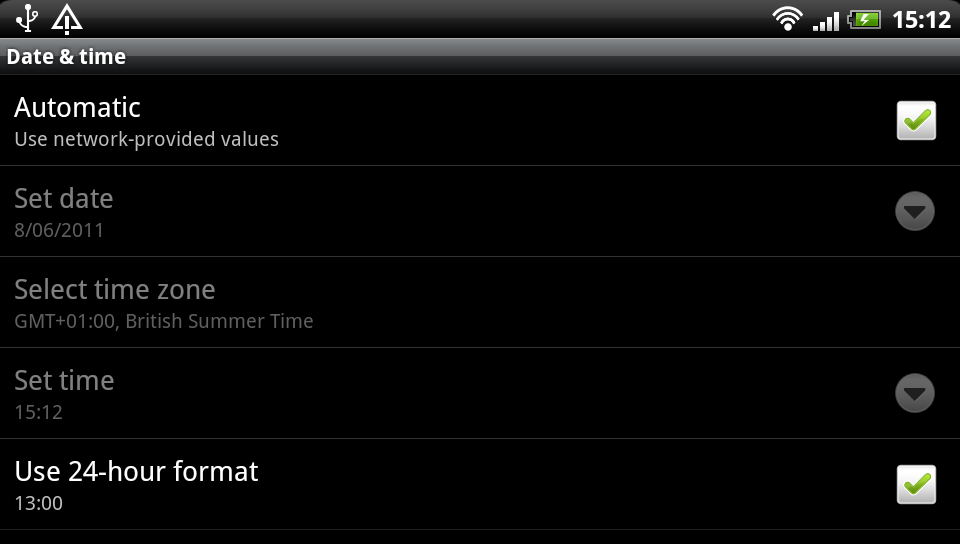
A bit of investigation reveals that when you enable ‘Automatic: use network-provided values’ in the Date & time settings the device makes a connection to one of a list of public NIST time servers and then updates its own time using the ancient Daytime Protocol.

All good so far, well done HTC.

A bit more playing with the clock revealed something else intriguing going on when the clock is manually altered. The device makes a separate HTTP connection to primary.sdstime.sdgtl.net. Now who are they?

The SDGTL.NET domain is registered to Saffron Digital Ltd in London. The very same Saffron Digital who have been recently bought out by HTC.

The HTTP request contains a client-generated nonce value along with the user-agent com.sdgtl.sectime – which also includes the device model number details and a ‘fingerprint’ value.

The response from the remote server is a XML getTimeResponse payload which contains the current Unix Epoch time and a digital signature.

So why does the device need this and why are HTC so concerned that you are manually changing the clock? My guess is that this is is being triggered by an embedded DRM service, perhaps related to Saffron Digital’s video service.

Issue 4581: Allow user apps to set the system time

There are many aspects of Google’s Android that make it the most exciting mobile operating system in many years, however it also has some rather obvious and frustrating omissions.

Issue 4581 (as it has become known) is an example of one such omission.

The date & time settings menu on an Android device does not allow the user to set the time to a granularity less than minutes. This means that you cannot accurately set the system clock to even within a few seconds.

The Android developers have wrongly assumed that all mobile operators support the Network Identity and Timezone (or NITZ) GSM specification for sending date & time to mobile devices, when in reality many do not.

If your mobile operator does not broadcast the NITZ information then your Android device will not automatically synchronise. In common with most computers the system clock on your mobile device may drift and after a few weeks can be many seconds or even minutes out of sync.

As accurate timekeeping is necessary for many applications, most other operating systems use an IP based time protocol – Simple Network Time Protocol (or SNTP) – to keep the system clock in sync with a global pool of atomic clocks. Android however does not include a SNTP client, nor does it allow installed applications to set the system clock either. So currently (as of Android 2.2 “Froyo”) it is not possible to keep your device clock accurate.

If you too feel that this is absurd, please visit the Issue 4581 page and add your vote for this issue.

UPDATE – 21st July 2011

Google have responded officially and closed this issue:

Hi, it is by design that applications can not change the time. There are many subtle aspects of security that can rely on the current time, such as certificate expiration, license management, etc. We do not want to allow third party applications to globally disrupt the system in this way.

I don’t agree with this explanation as device vendors are now providing IP based clock update mechanisms which co-exist with DRM, see HTC – Sensational at timekeeping for an example.

"Just avoid holding it in that way"

Those were the words of advice offered by Apple CEO Steve Jobs to a customer who emailed Jobs after experiencing antenna performance issues with his new iPhone 4 purchase.

What’s going on Apple?

When the original iPhone went on sale in June 2007 it changed the mobile industry overnight. This is not an overstatement. The traditional mobile handset manufacturers had become lazy and lethargic, churning out what was essentially the same product year after year with minor tweaks and trendy colour variants. Apple’s original iPhone product was nothing short of revolutionary in terms of user interface, style and engineering.

Apple were allowed to capitalise on their advancements because lazy handset vendors were unprepared and unable to react quickly enough. Many attempts were made to duplicate iPhone’s innovative touch screen user interface, most notably the much heralded Palm Pre, but none of them could claim to be a success. But that was then.

It took another relative newbie to the world of mobile devices to mount a serious challenge to Apple’s dominance – and that was the mighty Google. While Apple was content with making minor improvements to their devices, Google was plotting a revolution of their own.

Step up Google’s Android platform. Android has slowly gained momentum and adoption in the smartphone marketplace and recent handsets such as HTC’s Desire have finally become a credible alternative to iPhone.

Some would argue that Android’s capabilities have actually surpassed those of iOS (the new name for iPhone’s operating system). Credit for that in part is due to the decision to release Android as Open Source, while iOS has remained proprietary and tightly controlled by Apple – much to the chagrin of mobile application developers. In the first quarter of 2010 Android devices outsold Apple for the first time – and by quite some margin. Apple’s reaction was to sue HTC.

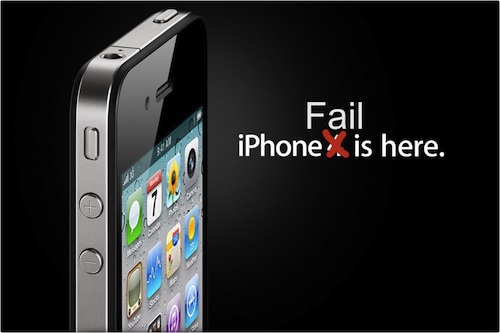
iPhone 4 Fail

So what of iPhone 4? Apple are in the unusual position of playing catch-up but this latest addition to the iPhone line up has failed to impress. Apple’s marketing campaign for iPhone 4 claims “This changes everything. Again.” Something has definitely changed, but not in a good way.

One day after the official iPhone 4 launch and customers are already complaining of poor antenna performance, yellow tinted displays and the ease of accidentally smashing iPhone’s “ultradurable” aluminosilicate glass panels. These problems would ordinarily have been identified during pre-release testing, but Apple’s paranoia dictates that test devices cannot be used without their protective plastic shroud and so early adopters have unwittingly become iPhone 4’s beta testers. There are parallels here with Microsoft’s old approach to product development, this is not something that Apple consumers are used to.

Customers forgave the original iPhone for its idiosyncrasies, restrictive capabilities and lack of features because it was something very special. Now there are many new mobile handsets that can justifiably claim to be special. iPhone 4 and the iOS 4 software update have brought iPhone up to a comparable specification level, but iPhone has lost its crown as the undisputed smartphone champion and the next generation are snapping at its heels.