Apple AirPort trusted networks list

I was tearing my hair out trying to understand why my MacBook repeatedly joined a WiFi network, despite my removing the SSID from the preferred networks list and deleting the AirPort network password from the System Keychain. I was attempting to force my MacBook to only associate with the 5GHz version of a WiFi network (on an Airport Extreme Base Station), but no matter what I did I would find that the MacBook occasionally reverted to associating with the original 2GHz SSID again.

The mystery was solved with the discovery that as well as the WiFi Preferred Networks list, there is a hidden trusted networks list buried deep within Mac OS X. Even if you remove a network SSID from the visible lists, your MacBook can still silently associate with previously saved networks.

Mac OS X retains WiFi network information and authentication credentials in the com.apple.airport.preferences.plist file which is located in the /Library/Preferences/SystemConfiguration folder.

To remove WiFi networks, either delete the individual networks from the KnownNetworks key using Property List Editor, or delete the file altogether and allow AirPort to rebuild it. It’s probably a good idea to turn AirPort off before editing the file.

There is an old Apple knowledge base article – AirPort: How to reset the trusted networks list – which also describes this.


How to permanently delete a Facebook account


It would seem that following the ‘deactivate account’ link in Facebook does not actually delete your account or remove your profile. Your account just goes into a limbo state and is automatically reactivated if you log in again.

If you want to permanently delete your Facebook account, follow this link to http://www.facebook.com/help/contact.php?show_form=delete_account

After submitting the form you should receive a confirmation email like this:

Subject: Account Scheduled for Deletion

Hi Victor,

We have received a request to permanently delete your account. Your account has been deactivated from the site and will be permanently deleted within 14 days.

If you did not request to permanently delete your account, follow this link to cancel this request:

http://www.facebook.com/account_delete.php

Thanks,

The Facebook Team

As long as you do not log into your Facebook account again with two weeks then your account will be permanently deleted.

Update: Have a read of Gizmodo’s Top Ten Reasons You Should Quit Facebook if you weren’t convinced already.

Prevent SSH session timeout

When using mobile broadband I found that a SSH shell session to a remote server would terminate unless I used it every few minutes. To overcome this use the ServerAliveInterval option to send a regular keepalive message to the remote server, which should be enough for the ISP firewalls to maintain the TCP session indefinitely.

Either add the SSH option via the command line, e.g.

$ ssh -o ServerAliveInterval=60 user@host

Or add the following line to ~/.ssh/config:

ServerAliveInterval 60  # Send a keepalive every 60 seconds

QED-uk.com and Mallplace.com spam

Well here’s an interesting thing. I registered with QED-uk.com (Miller Brothers Retail Ltd t/a Quality Electrical Direct) in July 2006 using an email address unique to that site.

Two years later I have been receiving spam emails from mallplace.com all sent to this same unique address.

Originating IP: 213.171.196.167
from: information@mallplace.com
subject: Best new website award goes to mallplace.com
Date: Tue, 23 Dec 2008 17:20:35 +0000

Originating IP: 213.171.196.167
from: information@mallplace.com
subject: Mallplace, January Sales!
Date: Fri, 26 Dec 2008 14:48:41 +0000

Originating IP: 213.171.196.167
from: information@mallplace.com
subject: mallplace.com given 5 star review by webuser magazine!
Date: Sun, 28 Dec 2008 21:26:51 +0000

So how did the mallplace.com spammers obtain my address I wonder?

The address of QED-uk.com is Miller House, Ogden Road, Doncaster, DN2 4SQ and the whois record for mallplace.com shows that the registrant is “pollock new media” of Miller House, Ogden Road, DN2 4SQ.

QED-uk.com’s web site makes this claim regarding privacy: “As a UK based company we abide by the rules and regulations of the Data Protection Acts of 1984 and 1998, and as such no information supplied to us will be given to or used by any third parties.”

Perhaps someone from Pollock New Media / Mallplace.com would care to comment on their association with Miller Brothers Retail Ltd / QED-uk.com?

UPDATE 17/12/2009

I am now receiving spam mail from ‘liGo Electronics <ichoose@ligo-electronics.com>’ to the same unique address that I used with QED-uk.com. This time they claim “You have received this email as a special customer of liGo.”

Oh really?

False Greetings

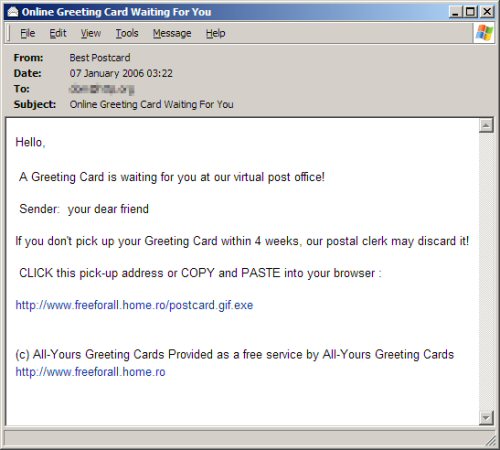
Another dangerous email to report. This one masquerades as an online greetings card:

Greeting

The link actually downloads a harmful executable file from a server in Romania. It contains a trojan which creates secret backdoor entry to your system, downloads more harmful software and gives the author remote virtual control over your PC. They can use this to spy on your activities or make you an unwitting participant in illegal activities.

  • Install decent anti-virus software and keep it up date
  • Never respond to unsolicitied emails, no matter how authentic they look