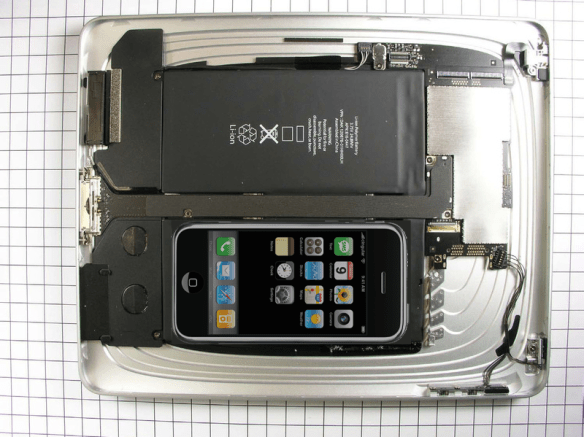
iPad international launch delayed by iXenophobia

Apple today released the following statement:

Although we have delivered more than 500,000 iPads during its first week, demand is far higher than we predicted and will likely continue to exceed our supply over the next several weeks as more people see and touch an iPad™. We have also taken a large number of pre-orders for iPad 3G models for delivery by the end of April.

Faced with this surprisingly strong US demand, we have made the difficult decision to postpone the international launch of iPad by one month, until the end of May. We will announce international pricing and begin taking online pre-orders on Monday, May 10. We know that many international customers waiting to buy an iPad will be disappointed by this news, but we hope they will be pleased to learn the reason—the iPad is a runaway success in the US thus far.

Even by Apple’s standards this is iGuff. Assuming that there are some Apple fanboys who are genuinely disappointed they won’t be getting their greasy fingerprints on an iPhone Giganotosaurus this month, is it any consolation to know they are being deprived simply because their cousins across the pond are deemed more worthy?

My Squeezebox is Booming again

After many months of uninterrupted usage, out of the blue my Squeezebox Boom started freezing and resetting. The display would alternate between the regular idle screen and “Connecting” and the device was almost completely unresponsive to controls.

Suspecting a software issue I performed a factory reset and re-entered network settings. Neither had a positive effect. I then tried connecting via Ethernet cable and the box worked fine again.

After some trial and error I discovered that my iPhone was also exhibiting erratic network behaviour on the same WiFi network. Data throughput speeds would vary wildly and performance was inconsistent.

There was no sign of anything wrong with either the WiFi access point or broadband router, so eventually I experimented with some settings and changed the WiFi channel. Hey presto! The Squeezebox immediately sprung back to life and the iPhone has consistent high throughput again. I can’t detect any other WiFi routers in the vicinity on the same channel, so I can only assume that some other wireless device is operating in the 2.4GHz band and was generating noise at that frequency.

If you’re having similar problems with your Squeezebox, try changing your WiFi channel.

Migrating from RAID1 to RAID5

There comes a time when RAID1 outlives its usefulness and it’s time to ‘upgrade’ to the more expandable RAID5. So what’s the simplest way of migrating existing RAID1 partitions to RAID5? Well it’s actually less painful than you might think.

As ever please backup any critical data to a separate drive before you undertake this. I have performed this on a Fedora 12 system and it completed without a hitch, but YMMV!

I recommend that you boot from a Fedora rescue disc so you’re not doing this on a ‘live’ system, then drop to the command prompt shell and follow these instructions:

Stop the existing RAID array:
# mdadm --stop /dev/md0

Create the new RAID5 array (cat /proc/mdstat to check on rebuild progress):
# mdadm --create /dev/md0 --level=5 -n 2 /dev/sda2 /dev/sdb2

Add an additional disk to the new RAID5 array:
# mdadm --add /dev/md0 /dev/sdc2

Now grow the partition to include the extra disk (again cat /proc/mdstat to check progress). This make take several hours depending on the size of the partition. The backup file can be used to restore data in the event of a system crash and should be stored on a separate device.
# mdadm --grow /dev/md0 --raid-disks=3 --backup-file=/mnt/ext/raid5.bak

Perform an integrity check on the new RAID filesystem:
# e2fsck -f /dev/md0

Then resize the partition to include the extra disk space:
# resize2fs -p /dev/md0

Add the new RAID configuration to mdadm.conf and create a new ramdisk image:
# chroot /mnt/sysimage
# mdadm --examine --scan | grep md0 >>/etc/mdadm.conf
# dracut -f /boot/initramfs-$(uname -r).img $(uname -r)

Splitting a Matroska (MKV) file

Looking for a quick command line solution to extract a specific section of video clip from a mkv (Matroska) file? Well look no further, mkvmerge can do this and more.

Using mkvmerge you can split a mkv file between specific timecodes to extract a timed video clip, for example to extract a 30 minute clip which starts 70 minutes into the source file:

mkvmerge --out outfile.mkv --video-tracks 1 --audio-tracks 2 --no-subtitles --no-attachments infile.mkv --split timecodes:01:10:00,01:40:00 --split-max-files 3

or put more succinctly:

mkvmerge -o outfile.mkv -d 1 -a 2 -S -M infile.mkv --split timecodes:01:10:00,01:40:00 --split-max-files 3

The above command will split the source infile.mkv into three new output files. The command line arguments specify using video track 1, audio track 2, and the removal of any subtitles or attachments.

The first outfile will contain the first 70 minutes, the second will contain the next 30 minutes (the segment you want) and the last outfile will contain the remainder of the file.

Easy when you know how 😀

Maplin / Nikkai A13JG DVD Player with Integrated Freeview

I was in the market for a combined DVD and Freeview unit with HD upscaling and HDMI output and the A13JG from Maplin seemed to fit the bill. At time of writing it is on sale at Maplin for just shy of £50.

A13JG

First impression on unboxing: It is cheap and nasty tat.

Second impression: My first impression was correct.

Despite my having an excellent roof mounted antenna which a Humax Freeview box shows as having 70% signal strength and 100% signal quality, the A13JG failed to maintain a consistent Freeview picture. When it did occasionally manage to display a picture the audio and video were out of sync (even worse when using 60 Hz mode).

The remote control looks and feels cheap (which it is I guess), the controls are complicated and the EPG is totally incomprehensible. I didn’t even get as far as testing out the DVD functions as there was no way I was going to keep it.

Perhaps I should have read the reviews first…

David (26/11/2009)

Unusable for freeview. After about 20-25 minutes the picture freezes. Sometimes more often – only seconds after changing channel up/down or power-cycle.

I returned to Maplin the very next day and was fortunately able to persuade them to refund me, although for all they knew I was returning a brick as they didn’t even open the box to check.

In summary, don’t even think about it.