How to sync Google Contacts with Apple Address Book

If like me you are considering migrating from Apple’s MobileMe to a more open (and free) repository for your PIM data, then Google’s Gmail could be the answer.

Once you have setup your Gmail account simply export your contacts from Address Book or MobileMe, then import directly into Google.

In Mac OS Address Book go to Preferences > Accounts and tick the ‘Synchronise with Google’ option. Enter the Google Account and Password that you wish to synchronise with. You may find that your contacts don’t appear immediately, but you can force a resync via iSync. To do this open iSync, go to Preferences and tick on ‘Show status in menu bar’. To force a manual resync click on the iSync icon (swirly arrows) in the Mac OS menu bar and choose ‘Sync Now’.

The default automatic sync interval is set to 1 day. This can be changed by editing the StartInterval key in ~/Library/LaunchAgents/com.google.GoogleContactSyncAgent.plist which has a default setting of 3600 seconds (1 day). I changed this to 300 seconds, which forces an automatic re-sync with Google every five minutes.

<?xml version="1.0" encoding="UTF-8"?>
<!DOCTYPE plist PUBLIC "-//Apple//DTD PLIST 1.0//EN" "http://www.apple.com/DTDs/PropertyList-1.0.dtd">
<plist version="1.0">
<dict>
<key>Label</key>
<string>com.google.GoogleContactSyncAgent</string>
<key>LimitLoadToSessionType</key>
<string>Aqua</string>
<key>ProgramArguments</key>
<array>
<string>/System/Library/PrivateFrameworks/GoogleContactSync.framework/Versions/A/Resources/gconsync</string>
<string>--sync</string>
<string>com.google.ContactSync</string>
<string>--periodic</string>
</array>
<key>StartInterval</key>
<integer>3600</integer>
</dict>
</plist>


Finally you should check through all your contacts to ensure that they comply with Google’s ActiveSync limitations:

The iPhone can synchronize up to 3 email address. Phone number synchronization is limited to 2 Home numbers, 1 Home Fax, 1 Mobile, 1 Pager, 3 Work (one will be labeled ‘Company Main’) and one Work Fax number.

Aside from some teething troubles when Google’s Calendar service went down last week, this setup has proven to be reliable and I can now keep my PIM data in sync between Mac, iPhone and Android devices.

Multiple identities in Apple Mail

Want a quick way to switch between email identities when sending email in Apple Mail? Well it’s remarkably easy – once you know how!

Instead of creating separate accounts, simply add all the email addresses separated by commas on the email address line in Mail > Preferences.

Mail.app will then display a drop down list of the addresses next to ‘From’ when you compose a message. Just pick the one you want and away you go. Don’t forget that if you are using an address not provided by your ISP then you may need to use SMTP authentication to prevent anti-relaying from blocking your outgoing mail as spam.

Green is Bad – at least where WD disks are concerned

I don’t have much luck choosing hard disks – see The Seagate fiasco

Having replaced all the dodgy Seagate disks in my RAID array with new Western Digital Caviar Green (WD6400AADS) drives in February, I have already stumbled upon a big new problem.

It would appear that these Caviar Green disks achieve some of their stated green-ness by using a ‘clever’ energy saving system which automatically parks the hard disk heads (moving them off the platters) if the disk has been idle for over 8 seconds. This apparently reduces aerodynamic drag while the platters are spinning and achieves some microscopic power savings.


According to the published WD Caviar Green spec sheet, the disks are rated for 300,000 of these head load/unload cycles during the warranted lifetime of the disk. I checked how many load/unload cycles my new disks had performed so far in their short 1,840 hours (76 days) of life and gasped at what I saw – 234,000 !

My disks had consumed 78% of their rated load/unload cycles in just over two months of usage! Why was this happening?

Some quick investigation revealed that this is due in some part to my using the disks in a Linux system and has been exacerbated by including them in a RAID array. I calculated that on average the disk heads have been loading and unloading every 30 seconds since I first started using them. That would mean an expected life span of just over 100 days 😯

I needed a solution – and quick. WD are not oblivious to this issue, but have not exactly been forthcoming in their marketing material to bring this to your attention. They have however published a knowledge base article – In Linux the S.M.A.R.T Attribute 193 Load/Unload counter keeps increasing on a SATA 2 hard drive – which states the following:

WD drives are designed to reduce power consumption, in part by positioning the heads in a park position (unloading the heads) and turning off unnecessary electronics, resulting in substantial power savings. WD defines this mode as Idle 3.

Some utilities, operating systems, and applications, such as some implementations of Linux, for example, are not optimized for low power storage devices and can cause our drives to wake up at a higher rate than normal. This effectively negates the power-saving advantages of low-power drives, such as WD GreenPower™ models, and artificially increases the number of load-unload cycles. Although the increase in load/unload cycles is within design margins (drive has been validated to 1 million load/unload cycles without issue) a balance between life of product, logging requirements, and low power consumption can be achieved depending on what is critical to the system. Present SMART normalized values have not been re-normalized to 1 million cycles so advisory reporting on this attribute does not mean failure of product.

WD also released a MS-DOS software tool called WDIDLE3.EXE which can be used to disable the idle mode feature altogether – RE2GP Idle Mode Update Utility (backup mirror site)

This firmware modifies the behavior of the drive to wait longer before positioning the heads in their park position and turning off unnecessary electronics.

It’s not exactly plain sailing to use this tool, particularly if you are running Linux. I found the simplest route was to copy the utility to the DOSAPPS directory of an Ultimate Boot CD, rebuild the ISO image, boot off it into FreeDOS and run it from there. After executing wdidle3.exe /d I saw the good news that “Idle3 Timer is disabled” on all disks and the Load_Cycle_Count counter has been permanently halted *phew*

I have hopefully saved my disks from an early demise but I fear that the amount of overuse they have suffered already may have caused permanent wear damage. I guess only time will tell.

The sound of silence

This morning I lay in bed and listened to nothing but the occasional light breeze blowing through the blossom in the trees outside and the cheerful morning chorus of chirruping local wildlife.

This is a special day, a day when I have not been rudely awoken from my slumber by the thunderous roar of Boeing 747s on their final approach overhead. This is the day that airplanes were banished from our skies, when we regained the most basic human right to be free of the unhealthy and invasive noise pollution.

A hushed sense of relaxation has enveloped the entire neighbourhood, conversations are no longer punctuated by the scream of jet engines from overhead, there is a holiday atmosphere.

The eruption of the Eyjafjallajokull volcano has granted us a brief glimpse of how life would be without the planes. Would I forsake foreign holidays and unseasonal imported fruit in return for this? You bet I would!

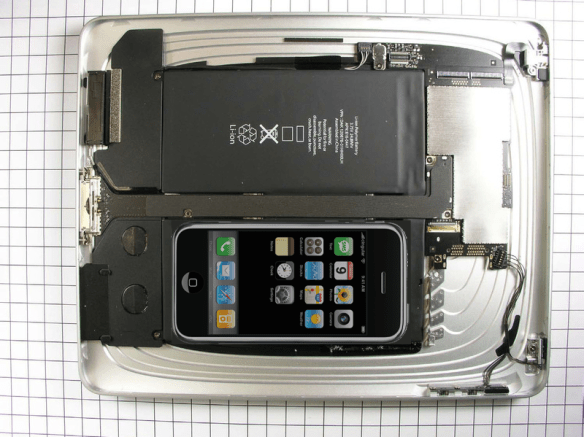
iPad international launch delayed by iXenophobia

Apple today released the following statement:

Although we have delivered more than 500,000 iPads during its first week, demand is far higher than we predicted and will likely continue to exceed our supply over the next several weeks as more people see and touch an iPad™. We have also taken a large number of pre-orders for iPad 3G models for delivery by the end of April.

Faced with this surprisingly strong US demand, we have made the difficult decision to postpone the international launch of iPad by one month, until the end of May. We will announce international pricing and begin taking online pre-orders on Monday, May 10. We know that many international customers waiting to buy an iPad will be disappointed by this news, but we hope they will be pleased to learn the reason—the iPad is a runaway success in the US thus far.

Even by Apple’s standards this is iGuff. Assuming that there are some Apple fanboys who are genuinely disappointed they won’t be getting their greasy fingerprints on an iPhone Giganotosaurus this month, is it any consolation to know they are being deprived simply because their cousins across the pond are deemed more worthy?