MSI K9MM-V & Fedora instabilities

I have finally given up on the apalling MSI K9MM-V motherboard and Fedora 8. While tweaking BIOS and kernel options resulted in a modicum of stability, it was only briefly sustained and kernel panics frequently resurfaced during reboots.

So farewell to the K9MM-V and a welcome hello to the Gigabyte GA-MA69VM-S2. This is a more costly board but having used Gigabyte boards successfully in the past I am happy to pay a little extra for a reliable platform.

I opted for a straight board switch and connected up the same trusty Seagate Barracuda IDE drives in a RAID1 mirror configuration. The mobo swap was relatively straightforward (apart from the processor being stuck fast to the heatsink on the old board), but unfortunately no matter what combination of boot options I used the Fedora kernel just would not detect my disk drives.

After much head scratching I finally realised that the ata drivers were missing from the initrd image and so I needed to rebuild. So for those in the same bind, here’s what to do:

Boot from the Fedora install DVD into rescue mode (your partitions will be mounted under /mnt/sysimage)

chroot /mnt/sysimage

Edit /etc/modprobe.conf and add the line “options libata atapi_enabled=1”

rm -f /etc/sysconfig/hwconf

/usr/sbin/kudzu

mkinitrd -f /boot/initrd-$(uname -r).img $(uname -r)

To check the contents of your new image:

gzip -cd initrd-$(uname -r).img | cpio -id

HomePlug Powerline

In a previous entry I bemoaned the proliferation of wireless devices and the unseen fog of wireless transmissions around the home. A new(ish) technology – HomePlug Powerline – goes some of the way to alleviate this.

HomePlug works by sending data signals around the domestic electricity ring main, much in the same way as broadband is delivered alongside your standard telephone line. The HomePlug devices act as ethernet bridges, so to attach to the network you simply plug a HomePlug device into a free mains outlet, connect up your ethernet cable and away you go.

HomePlug 1.0 specification devices provide up to 85Mbps bandwidth and are compatible with each other so you can mix and match types. The newer HomePlug AV specifications claims up to 200Mbps, although I have not tried these yet.

Since installing these devices I have been able to do away with Wi-Fi entirely, thus providing a safer electromagnetic environment and more secure network.

I recommend Solwise for their HomePlug range of products. Delivery has been next day and the products very reliable.

Stamp recycling?

What do blind people and donkeys have in common? Used stamps apparently.

I recently witnessed a usually sane friend carefully cut out and save a used stamp from an envelope, he said that he was saving them for “some woman at work who gives them to donkeys”.

Don’t get me wrong, I am an active recycler and would gladly support any scheme to reduce our waste, but how do donkeys benefit from stamps? I mentioned this riddle to a few people and was told that blind people collect them too. Time to investigate further! My early ‘research’ unearthed some other people asking the same question on Internet forums. They had been collecting away out of some halcyon notion that they were doing something worthwhile and were now desperately searching for someone to actually send them to.

First stop was the RNIB, who say:

“Stamps are sorted by volunteers and then sold to dealers and collectors. They are mostly sold by weight, if we can identify any valuable stamps they can be sold for a higher price. As a general guideline RNIB can expect to receive 90p or £1 for a pound weight of stamps.”

So it is true! In fact there are a number of charities vying for your stamp collection:

The Guide Dogs for the Blind Association say:

“… stamps can also be recycled to make money for Guide Dogs as these can be sold to collectors.”

Help the Aged are in on the act, quoting the same worth as RNIB:

“On average Help the Aged receives 90p or £1 for a pound weight of stamps.”

So my friend was not so mad after all… or was he?

All these charities conveniently supply an address to post your stamps to, but have they calculated how much it costs to send 1 pound (454 grams) of stamps? Well I will tell you. Due to it’s size your consignment will be classified as a ‘packet’ by Royal Mail and costs £1.39 to send by Second Class post.

So it actually costs more to send your stamps to the charity than they will earn back! All your diligent and painstaking collecting would amount to a nett loss of nearly 50p per pound weight of stamps.

Ignoring the postage costs and estimating that a stamp weighs 100mg, you would need to collect over 4,500 stamps to earn that £1. This values your collected stamps at just 0.02p each (i.e. collect fifty to make a penny). Perhaps this is all just a clever ruse to export our waste abroad? 😉

Please stop this ridiculous nonsense, do us all a favour and just send them the quid!

Oh, and nothing from The Donkey Santuary. Perhaps donkeys just like the taste? 😛

Donkey

Silence your PC

After a bit of trial and error I have built what I consider to be an almost silent PC server. I quickly identified that most of the noise comes from fans, these are a necessary evil to cool your PC, but there are quieter alternatives. By removing the chipset fans altogether and replacing them with larger and more efficient heatsinks, I was able to cut down noise while keeping the components adequately cooled.

I chose the quietest hard disks I could find, the Seagate Barracuda 7200.7 ST380011A. Seagate claim “idle accoustics of 2.5 bels – the industry’s best” and I do agree that they are remarkably quiet.

Next was the PSU. I initially tried a Zalman AM300B-APS “ultra-quiet” PSU but this was still too noisy for my delicate ears. Instead I opted for an Etasis EFN-300 300W 0db fanless ATX PSU. As the name implies, this has no fans at all and relies on dissipating heat through metal fins exposed at the back of the unit. I was initially concerned that the fins would run hot, but it has been surprisingly cool to the touch – and reliable!

Finally I tackled the CPU (AMD Athlon XP 2200+ 1.8GHz SoA). This is the one component that runs very hot and cannot generally be cooled by passive convection. I installed a Zalman CNPS7000B-AlCu Super Flower Cooler which has a silent mode by adjusting the fan speed using the ‘FAN MATE 2’ accessory. It is not totally silent, but at low speeds is probably as good as you could expect.

Overall, my silent PC server has been a roaring 😉 success. It has been running continuously since September 2004 and none of the modified components have showed any signs of failing. The CPU and twin Seagate disk drives run at a constant 48°C, both well within normal operating temperatures.

Suppliers:

False Greetings

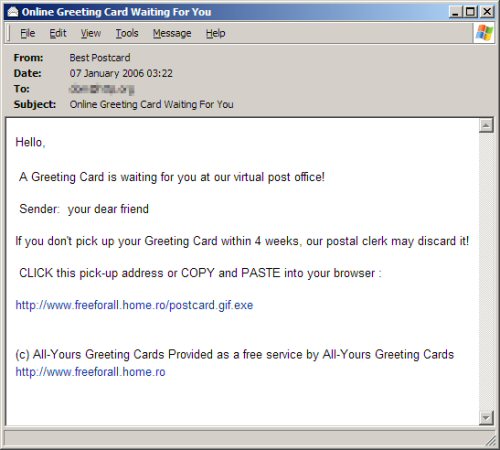
Another dangerous email to report. This one masquerades as an online greetings card:

Greeting

The link actually downloads a harmful executable file from a server in Romania. It contains a trojan which creates secret backdoor entry to your system, downloads more harmful software and gives the author remote virtual control over your PC. They can use this to spy on your activities or make you an unwitting participant in illegal activities.

  • Install decent anti-virus software and keep it up date
  • Never respond to unsolicitied emails, no matter how authentic they look