Cookie Monster

On visiting the web site of The Royal Borough of Windsor & Maidenhead you are greeted with this message:

To which if you respond that you don’t consent to receiving cookies you get this message:

What part of “No, I don’t consent to receiving cookies” do they not understand?!

Gmail window in Safari

I like to have a separate Safari browser window for Gmail sessions, without the Safari toolbar or bookmarks bar.

It’s a bit of a pain to set this up each time the browser is reset, so here’s a handy tip for creating a bookmarklet which opens Gmail in an uncluttered window of its own:

javascript:window.open("http://gmail.com/","gmail","titlebar=0");

Save this bookmarklet to the first position in your personal bookmarks bar and you can also access it using the shortcut key Command+1.

EvoCam vs SecuritySpy

The options for network camera recording software are a bit limited on Mac OS. The two most popular products in this space are Evological’s EvoCam and Bensoftware’s SecuritySpy.

So which is best?

On price alone you might be tempted by EvoCam as it costs just $30 (under £20) for an unlimited number of cameras, while SecuritySpy will set you back £30 for a single camera license and a whopping £500 for unlimited camera support.

I’ve had an opportunity to evaluate both products and have come to the conclusion that you really do get what you pay for.

EvoCam does the job well enough and has a more polished user interface, but it also suffers from a major problem that lets it down badly, almost to the point of being unusable. For reasons unknown it ties up the processor for even a simple one camera recording setup.

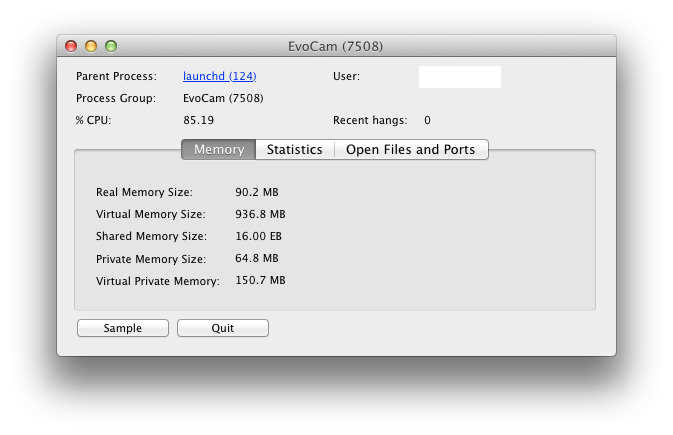
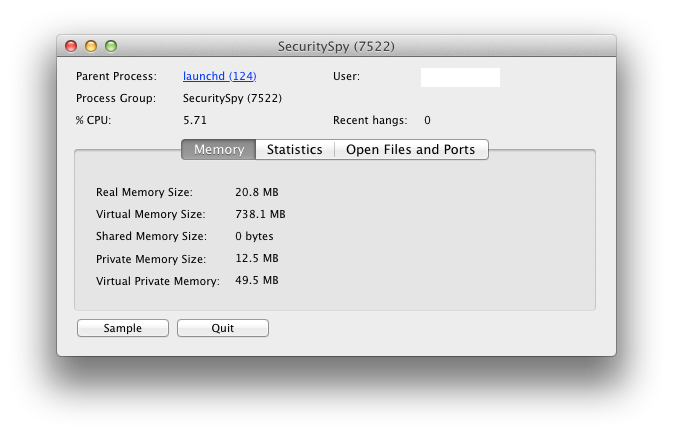
Activity Monitor output taken for identical recording sessions is below:

In these examples (from a Mac Mini 2.26GHz Intel Core 2 Duo with 4GB RAM), EvoCam consumes 85% CPU and 90MB real memory, while in comparison SecuritySpy consumes a meagre 6% CPU and 21MB real memory. That’s quite a difference and it’s very noticeable when you try to use the same host machine for other work.

So if you have the luxury of a dedicated powerful server for your camera recording then EvoCam is probably the most cost effective option, but if you want something that works reliably and doesn’t take over your machine then SecuritySpy is well worth the extra investment.

GSecure: Encrypt your Google Drive

Google Drive has finally launched, but privacy campaigners have already reviewed Google’s Privacy Policy and raised questions about the legal ownership of files you store on ‘your’ G Drive.

But what Google can’t see they can’t use right? 🙂

Using EncFS and some tools you can create a totally secure encrypted filesystem on top of the standard Google Drive in under 5 minutes.

Mac OS instructions only below.

First download and install Fuse4X and a version of EncFS which uses the Fuse4X APIs. Thanks to Simone Lehmann for providing an EncFS Mac installer at http://www.lisanet.de/?p=128 (also mirrored here).

To create a new encrypted volume (stored locally at first to prevent the EncFS key from being synchronised with Google Drive):

encfs ~/Desktop/_Encrypted ~/Documents/_GSecure

Answer ‘yes’ when prompted to create the new folders and choose ‘p’ for pre-configured paranoia mode (256-bit AES encryption). Enter a secure EncFS password when prompted and you’re done.

Now the filesystem has been created we can deal with securing the key.

umount ~/Documents/_GSecure
mkdir ~/.keys
mv ~/Desktop/_Encrypted/.encfs6.xml ~/.keys/gsecure.xml

The commands above move your key from the EncFS filesystem into a hidden folder in your (local) home directory

Now move the entire ~/Desktop/_Encrypted folder (minus your key) into your Google Drive:

mv ~/Desktop/_Encrypted ~/Google\ Drive/

Finally download my GSecure application and copy it to your Applications folder.

The first time you run GSecure it will prompt you for your EncFS password which it stores in your local login keychain. The password must match the secure password you set in a previous step.

To mount or unmount the encrypted filesystem simply run the GSecure app. For convenience copy it to your Mac OS Dock for quick access.


Hapless Harry

In the ten game spell since Fabio Capello quit as England football manager, Spurs have won just 2 games, drawn 3 and lost 5. We were also thrashed in the North London derby and humiliated in a 5-1 FA Cup semi-final defeat at Wembley against Chelsea.

That current league form ranks Spurs in 16th place, a point behind Blackburn and Bolton who coincidentally are the next two teams we face.

Table courtesy of weekendfootball.co.uk

On that form it’s going to be a real challenge to make 5th place, let alone 4th.

What does England manager-elect Redknapp have to say in his defence?

After losing 2-1 to Norwich:

“Well all credit to them. I thought they deserved it, they worked very hard today and made it difficult for us. They played excellent. We were disappointing. I changed the system, I played 4-4-2 today, we played with four forwards and I really felt we were too open. We’ve got five big games to go, we’ve got to really look to win all five games.”

You might think that as manager he was actually responsible for the formation and tactics and could perhaps make changes if it wasn’t working?

After losing 1-0 to QPR:

“There’s four games left, we’ve got to win the last four games now. I think you’re gonna need 12 points now, you’re going to have to pick up 12 points from the last four games. It’s going to be tight, it’s all to play for. Four games to go, we need four wins.”

“We need to win x games”. That seems to be a recurring quote from Harry.

You don’t need to be a master tactician or even a mathematician to work that one out.

Fortunately The FA are all set to come to the rescue and pay to ‘release’ Harry before he suffers the ignominy of a sacking. So it’s ‘Harry for England’ and COME ON YOU SPURS!