"Just avoid holding it in that way"

Those were the words of advice offered by Apple CEO Steve Jobs to a customer who emailed Jobs after experiencing antenna performance issues with his new iPhone 4 purchase.

What’s going on Apple?

When the original iPhone went on sale in June 2007 it changed the mobile industry overnight. This is not an overstatement. The traditional mobile handset manufacturers had become lazy and lethargic, churning out what was essentially the same product year after year with minor tweaks and trendy colour variants. Apple’s original iPhone product was nothing short of revolutionary in terms of user interface, style and engineering.

Apple were allowed to capitalise on their advancements because lazy handset vendors were unprepared and unable to react quickly enough. Many attempts were made to duplicate iPhone’s innovative touch screen user interface, most notably the much heralded Palm Pre, but none of them could claim to be a success. But that was then.

It took another relative newbie to the world of mobile devices to mount a serious challenge to Apple’s dominance – and that was the mighty Google. While Apple was content with making minor improvements to their devices, Google was plotting a revolution of their own.

Step up Google’s Android platform. Android has slowly gained momentum and adoption in the smartphone marketplace and recent handsets such as HTC’s Desire have finally become a credible alternative to iPhone.

Some would argue that Android’s capabilities have actually surpassed those of iOS (the new name for iPhone’s operating system). Credit for that in part is due to the decision to release Android as Open Source, while iOS has remained proprietary and tightly controlled by Apple – much to the chagrin of mobile application developers. In the first quarter of 2010 Android devices outsold Apple for the first time – and by quite some margin. Apple’s reaction was to sue HTC.
iPhone 4 Fail

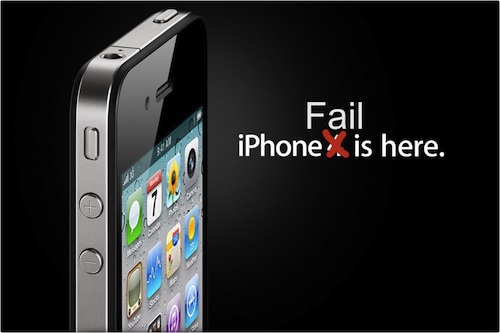
So what of iPhone 4? Apple are in the unusual position of playing catch-up but this latest addition to the iPhone line up has failed to impress. Apple’s marketing campaign for iPhone 4 claims “This changes everything. Again.” Something has definitely changed, but not in a good way.

One day after the official iPhone 4 launch and customers are already complaining of poor antenna performance, yellow tinted displays and the ease of accidentally smashing iPhone’s “ultradurable” aluminosilicate glass panels. These problems would ordinarily have been identified during pre-release testing, but Apple’s paranoia dictates that test devices cannot be used without their protective plastic shroud and so early adopters have unwittingly become iPhone 4’s beta testers. There are parallels here with Microsoft’s old approach to product development, this is not something that Apple consumers are used to.

Customers forgave the original iPhone for its idiosyncrasies, restrictive capabilities and lack of features because it was something very special. Now there are many new mobile handsets that can justifiably claim to be special. iPhone 4 and the iOS 4 software update have brought iPhone up to a comparable specification level, but iPhone has lost its crown as the undisputed smartphone champion and the next generation are snapping at its heels.

Samba copy fails after upgrade to Mac OS X 10.6.3

Ever since upgrading to Mac OS X 10.6.3 I had been unable to copy files from my MacBook to a Linux Samba share, which had previously worked flawlessly. The file copy would fail and Finder displayed the error message: “The operation can’t be completed because you don’t have permission to access some of the items” or “The Finder can’t complete the operation because some data in xxx can’t be read or written. (Error code -36)”.ErrorI found several articles suggesting solutions, the only one that eventually worked for me was to add the line “unix extensions = no” to the [global] settings of the smb.conf file on the Linux server. After a restart of the SMB processes file copying is working again.

Thanks for all the time I wasted on resolving this one Apple!

Apple AirPort trusted networks list

I was tearing my hair out trying to understand why my MacBook repeatedly joined a WiFi network, despite my removing the SSID from the preferred networks list and deleting the AirPort network password from the System Keychain. I was attempting to force my MacBook to only associate with the 5GHz version of a WiFi network (on an Airport Extreme Base Station), but no matter what I did I would find that the MacBook occasionally reverted to associating with the original 2GHz SSID again.

The mystery was solved with the discovery that as well as the WiFi Preferred Networks list, there is a hidden trusted networks list buried deep within Mac OS X. Even if you remove a network SSID from the visible lists, your MacBook can still silently associate with previously saved networks.

Mac OS X retains WiFi network information and authentication credentials in the com.apple.airport.preferences.plist file which is located in the /Library/Preferences/SystemConfiguration folder.

To remove WiFi networks, either delete the individual networks from the KnownNetworks key using Property List Editor, or delete the file altogether and allow AirPort to rebuild it. It’s probably a good idea to turn AirPort off before editing the file.

There is an old Apple knowledge base article – AirPort: How to reset the trusted networks list – which also describes this.

Technika Smartbox 8320HD software builds

Software Update

Here’s a list of the software updates for the Technika Smartbox 8320HD and the bugs addressed in each build.

v4.7.47-10 (04/05/2010)

Launch build. IP Vision claim this was “an incorrect software version” installed due to “an error in the manufacturing process” – yeah, right!

v4.7.48-08 (07/06/2010)

  • the issue of loss of audio while playing back recorded HD programmes or timeshifted HD programmes will be resolved
  • when the SmartBox is in lower-power standby, the internal fan will be stopped

v4.7.48-09 (08/06/2010)

  • an issue with the remote control sensitivity (auto repeat too quick)

v4.7.48-11 (10/06/2010)

  • OK key show INFO bar rather than toggle pause/play

v4.7.48-16 (21/06/2010)

  • Pause key allows video to be paused (timeshift and video player)
  • PiP key shows last viewed channel and allows switching back to it
  • Improvements to recordings management and playback when handling multiple recordings
  • New “recordings todo” list to list upcoming scheduled recordings and series linking

    Technika Smartbox 8320HD

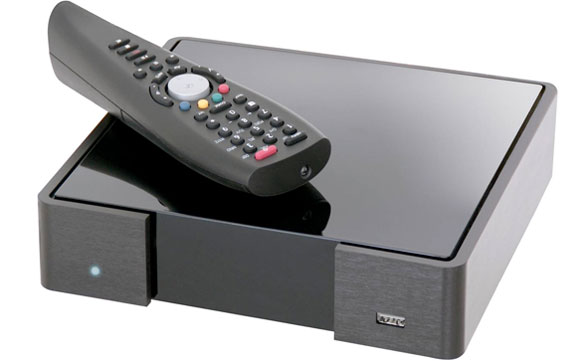
    Here’s the low down on the new Technika Smartbox 8320HD sold exclusively by Tesco.

    The box is made by IP Vision (UK), the company behind the Fetch TV service brand. The hardware technology inside the box is based on the Netbox N8000 series of digital set top boxes from Netgem.

    Below are some problems I have encountered to date and recommended solutions:

    How do I use the Smartbox 8320HD with a Logitech Harmony universal remote control?

    • In the Logitech Harmony Remote Software choose Cable/Satellite Box > Digital Set Top Box > Manufacturer: Netgem > Model: N-7680

    Problems with the remote control skipping two lines at a time when you use the navigation buttons?

    • If you have a Harmony remote, go into the Logitech Harmony Remote Software and select the Netgem device, then ‘Troubleshoot’ > ‘Netgem responds to some commands either too many times or only occasionally’ > ‘0’

    The message “This programme requires HDCP, but your HDTV doesn’t seem to support it” appears on the TV screen when attempting to view HD channels:

    • Power off the Smartbox and all devices connected to it, including the TV and any intermediate A/V equipment connected via HDMI. Power them all back on again after a couple of minutes.

    Smartbox goes into standby mode every night, even when ‘Screensaver timeout’, ‘Auto standby delay’ and ‘Energy savings delay’ are all set to ‘disabled’ in the display preferences:

    • Response from FetchTV support 17/06/2010 – “Unfortunately it is not possible to stop the box from going into stand-by mode whilst it is not in use.”

    Will I be keeping my Smartbox? Well surprisingly yes I think I will. Despite the bugs and multiple software updates, this box has the potential to be rather great. The integration of iPlayer and SkyPlayer is slick and for the money and features there is nothing to compare with it.

    UPDATES:

    • The problem with the remote control has been addressed in the v4.7.48-09 software.
    • Tesco have withdrawn the 8320HD from sale