Making /Volumes visible in Finder

Since working out how to automount Drobo FS shares I’ve been looking for a way of having my /Volumes folder appear in Finder.

The solution is to use the SetFile command line tool:

/usr/bin/SetFile is a tool to set the file attributes on files in an HFS+ directory.

To make the /Volumes folder visible:

sudo SetFile -a v /Volumes

To make the /Volumes folder invisible again:

sudo SetFile -a V /Volumes

You can apply this to any folder that is invisible by default in Finder.

Coinks communications

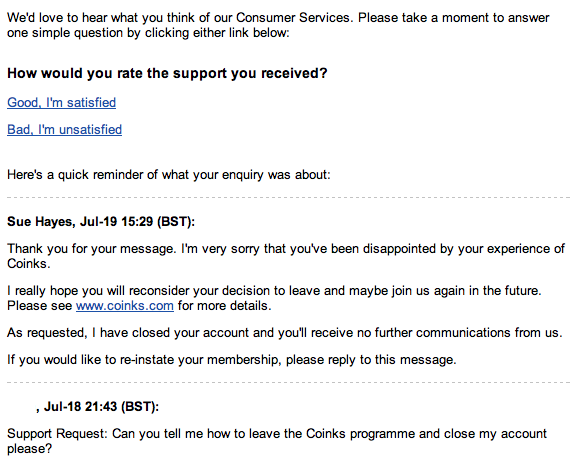
Me: “Can you tell me how to leave the Coinks programme and close my account please?” (18th July 2011)

Coinks: “I have closed your account and you’ll receive no further communications from us” (19th July 2011)

Coinks: “We’d love to hear what you think of our Consumer Services” (20th July 2011)

*sigh*

iTunes Connect Availability Date

What time will an app go live in iTunes when setting an Availability Date in the future?

The answer is quite simple. Assuming your app has been approved and is in the ‘Ready for Sale’ state, it will be published in each App Store territory at midnight local time.

For example, if you have chosen to publish your app in the Australian, UK and US App Stores and set an availability date of 1st June then your app will go live at 0.00 hrs local time on the morning of 1st June in each territory.

The time in London when your app will go live:

  • Australia: 31st May 15.00 hrs
  • United Kingdom: 1st June 00.00 hrs
  • United States: 1st June 08.00 hrs

This means that your app will go live in some territories before it is available in the UK.

Problems with 1Password Reader for Android

I’ve been using the 1Password application from AgileBits for a few years. It has been a Godsend for keeping track of the hundreds of logins and secure notes I need to keep in sync across multiple machines.

One of the more recent additions to the client portfolio is the free 1Password Reader app for Android.

The app allows you to read your secure credentials from a 1Password keychain stored on your SD card or Dropbox folder.

This app has been working well right up until the v1.8.1.1 update which was released to Android Market on 20th June. After that the app would no longer import my 1Password keychain and was reporting the error “Urecognizable keychain”.

After some investigation I found that the cause of the problem was that my 1Password keychain did not have the correct file extension, in fact it didn’t have a file extension at all and was displaying in Finder as a folder.

The 1Password keychain is in fact a package file and the latest version of the Android app needs the keychain to have the file extension of .agilekeychain.

To find out where your 1Password keychain file is have a look for a hidden file called .ws.agile.1Password.settings in the root of your Dropbox folder. The contents of this file is the location of your 1Password keychain file.

To fix my Android problem I closed the 1Password Mac client and then added the .agilekeychain file extension to my 1Password keychain folder in Dropbox. The next time I fired up the Mac client I went into Preferences > General and updated the Data File location to match the renamed keychain.

This has fixed the Android issue which now imports the Dropbox keychain without any problems.
My Internet Anniversary


I noticed this week that I recently past the milestone of the 20th anniversary of my first public Internet post in 1991. This was the same year that the first ever web page was published by Tim Berners-Lee at CERN.

My first verifiable post was to a Usenet newsgroup (now commonly known as Google Groups) on 6th March 1991. It was my first post on the public Internet, although I had also been active on the Fidonet BBS network for some time before then.

I’d love to say that my first post was about something terribly profound or academically significant, but in fact it was incredibly frivolous and befitting of a boozy student.

As an exercise for the reader – can you find it? 🙂