HTC’s Dropbox bonus deception

HTC have been promoting a partnership with Dropbox which gives HTC smartphone customers an additional 3GB of free Dropbox storage space.
The extra storage capacity appears when you activate the Dropbox client on a HTC smartphone with the new HTC Sense 3.5 software.

There’s something they don’t tell you though, which only becomes apparent when you receive the confirmation email from Dropbox:

Congrats on becoming a Dropbox Guru! We’ve awarded you 3GB of bonus space for the next 12 months! You now have 5.25GB on Dropbox. To get even more space, check out our upgrade options.

Thanks again for supercharging your HTC phone with Dropbox!

According to the email, the 3GB bonus space is only awarded for 12 months.

This has been confirmed in the Dropbox support forums by their staffer ‘Michael N’:

We are excited to confirm the announcement from HTC. Owners of HTC phones with a Sense 3.5 ROM will be receiving 3GB of extra space for 1 year, free of charge. All you need do to earn the space is install the Dropbox app on the HTC phone, then complete the Getting Started Quest at www.dropbox.com/gs

So what happens if you are still using the 3GB of bonus space at the end of the 12 months?

Well according to an update from Michael N: “The 3GB extra space goes away, and you’re over quota. Your Dropbox desktop client will stop syncing.

Your options are then to delete files and reduce your storage to under the 2GB free limit or upgrade to Dropbox’s Pro 50 plan at a cost of $9.99/month. How convenient!

While Dropbox themselves have been fairly transparent, HTC have been careful not to mention this built-in timebomb.

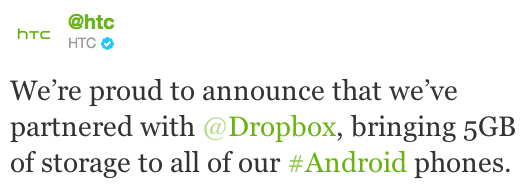
The bonus space is time-limited and only available to owners of a HTC phone with the new Sense 3.5 ROM. This is very different to HTC’s announcement: “We’re proud to announce that we’ve partnered with @Dropbox, bringing 5GB of storage to all of our #Android phones.

The Advertising Standards Authority now regulates advertising across all media -including marketing on websites. I wonder if this includes marketing statements made on Twitter from an official company account?

I feel a complaint to the ASA coming on!

Kindle Tax

I don’t have much spare time to indulge in picking up a book, so when I do have the occasional few minutes what I need is quick and easy access to books on demand.

The 21st century solution to my needs is an eBook reader. It would allow me to keep all my books in one place and I won’t have weighty tomes cluttering up the bookshelves. I suppose there’s also a minuscule environmental benefit too 🙂

I’m sold on the obvious benefits, so what about the cost of the books?

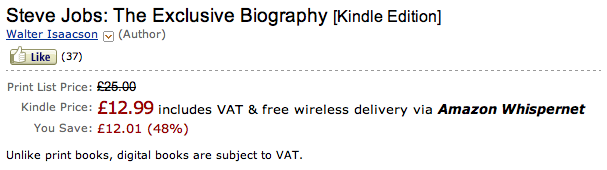
Now call me old fashioned (I dare you!), but I did expect eBooks to cost less than the manufactured print equivalents. So a quick look at the most popular eBook seller – Amazon – had me confused.

Why are the electronic versions sometimes more expensive than their tree-killing counterparts?

For purchases made within the European Union, this is partly due to the addition of Value Added Tax (VAT).

Conventional print books have historically been treated as an exceptional item and attract a zero rate of VAT in the UK. An eBook however is classified as the “supply of the digitised content of books over the internet or an electronic network” and standard rates of VAT apply.

This is an unexpected reality, but maybe not a showstopper for me. At least I’ll be contributing to the UK economy right?

Unfortunately that’s a false assumption.

Amazon claims to deliver Kindle purchases from Luxembourg and according to the Kindle License Agreement: “The laws of the Grand Duchy of Luxembourg, without regard to principles of conflict of laws, will govern this Agreement and any dispute of any sort that might arise between you and Amazon.

The standard rate of VAT in Luxembourg is 15% and this is the sales tax included in the price of Kindle eBooks.

Every time you purchase a Kindle eBook from Amazon.co.uk you unwittingly contribute 15% of the purchase price to the Luxembourg economy.

I’d better put up some more shelves.

Hotmail account recovery

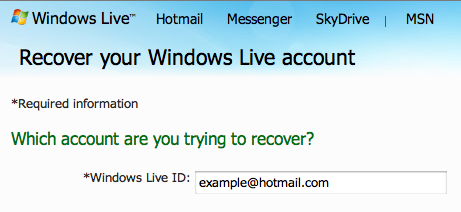
I’m trying to resurrect an old hotmail.com address to use it as a Windows Live ID.

Admittedly the last time I used the address was a few years ago, but it is still mine and I should be able to get it back right?

The first obvious problem I encounter is that I’ve forgotten the password. I try the ‘Reset your password‘ link and gave the secret answer to my security question.

Windows Live responds with: “This option is temporarily unavailable because incorrect information was entered too many times. Please try another option or try again later.”

So far so bad.

I go for the ‘Customer Support’ option instead and attempt to fill out an account recovery form.

“Help us to make sure that this is you. To recover your account, enter as much information as you can.”

I have a go at providing old passwords, possible subject lines for old emails and contacts I’ve previously sent email to. I last used the account in 2008 so my memory is more than a bit hazy.

After a few hours I received this email response from Microsoft:

Unfortunately, we could not verify your ownership of example@hotmail.com using the information you provided. Your account recovery request with issue number 12345678 has been closed.

In keeping with Microsoft’s commitment to protecting online privacy, Windows Live takes account security seriously. Passing the account recovery process can be difficult. Please reconsider your originally submitted information, as well as provide any additional information when submitting a new account recovery request.

Here are some suggestions to assist you in submitting a new request:

  • Answer questions using the information you used when you created the account or last updated it.
  • Submit the recovery request from a computer you frequently use for Windows Live services.
  • Answer as many questions as you can and be as precise as possible.
  • For questions with multiple answers, such as email subjects and contacts, provide as many answers as you can.
  • If you have difficulty remembering email subjects or contacts, try reaching out to family, friends, or business contacts to verify.

Ready? Click here to submit a new Windows Live account recovery request.

Please do not reply to this message. Replies to this message are routed to an unmonitored mailbox.

Thank you,
Windows Live

Not a great help. I’ve tried a couple more times, but I get the same response each time.

Does anyone have any suggestions, or have I lost my account forever?

BlackBerry Fool

This post could perhaps have been more aptly titled ‘BlackBerry Jam’, but actually I don’t want to focus on the widespread service failures so much as the foolish customers who chose to rely on BlackBerry in the first place.

Why is it only now they realise that what they bought into wasn’t the Internet in your pocket, but a totally proprietary email and messaging service with an inherent single point of failure?

For the uninitiated, BlackBerry is a mobile email, messaging and web browsing service provided by Research In Motion Limited (RIM). The difference with BlackBerry services is that you don’t have a direct connection to the Internet like everyone else, instead all your mobile data traffic is tunnelled through RIM’s data centre(s).

The advertised advantage of this approach is that RIM applies data compression techniques to make more efficient use of the available bandwidth, which should result in faster web browsing and quicker email delivery.

For the privilege of using their data optimisation service RIM levies a hefty monthly System Access Fee (or SAF). This hidden per-subscriber BlackBerry tax is usually collected by the mobile operators in the form of higher monthly subscriptions or call charges.

The SAF revenue stream is hugely lucrative for RIM, which is why they are so keen to keep customers tied into their proprietary service model.

But RIM’s unique selling point is also their biggest flaw.

The problem with their architecture is that you are putting all your metaphorical eggs in RIM’s one basket. As we’ve seen with the prolonged service outages over the last two days, if RIM’s servers go down then so does all your connectivity.

RIM have been surprisingly tight-lipped about the problems. There is nothing on their corporate web site, nothing in the press releases. It’s like we imagined the whole thing!

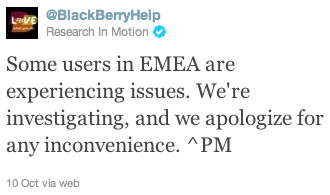
The only source of information I’ve found is RIM’s official Twitter support account.

The news was broken yesterday with:

Some users in EMEA are experiencing issues. We’re investigating, and we apologize for any inconvenience.

This was followed up by:

We apologize to any of our customers in Europe, Middle East & Africa still experiencing issues. We’ll bring you an update as soon as we can.

BlackBerry email services restored. Some users still experiencing delays with browsing and IM. Sorry for inconvenience.

Just when we thought everything was getting better, more problems this afternoon:

Some areas have messaging delays and impaired browsing. We’re working to restore normal service as quickly as possible.

The most recent RIM Tweet says:

Message delays were caused by a core switch failure in RIM’s infrastructure. Now being resolved. Sorry for inconvenience.

Lots of faceless apologies from RIM, which is of little consolation to their customers.

This issue reminds me of my blog post about the Proprietary Internet. The success of the Internet has been that its distributed architecture makes it resilient from individual system failures. It was deliberately designed this way.

If you tie yourself into a single service provider then don’t be surprised if one day you too find yourself cut adrift from the connected world. If this communication tool is so critical to your business then it’s your duty to ensure that you have exercised due diligence in your choice of service provider.

You’ve only got yourselves to blame!