Google Calendars not visible on Android device

Have you added a Google calendar and it’s not showing up on your Android device?

Try this:

Go to Settings > Applications > Manage Applications > All

Then:

Calendar > Clear data

Calendar Storage > Clear data

Google Calendar Sync > Clear data

Then go into Accounts & sync and perform a Sync now

Your new calendar should now be visible on the device.

If you’re also syncing an iPhone, go to http://m.google.com/sync from your iPhone and select which calendars will be visible on the device.

HTC – Sensational at timekeeping

As has been noted previously, the clocks on some Android devices have an annoying habit of drifting significantly.

I was pleasantly surprised then to discover that the new HTC Sensation does keep very good time, even without NITZ being broadcast by my operator’s mobile network.

So how and why are they doing this? Is there another motive behind this seemingly altruistic feature addition?

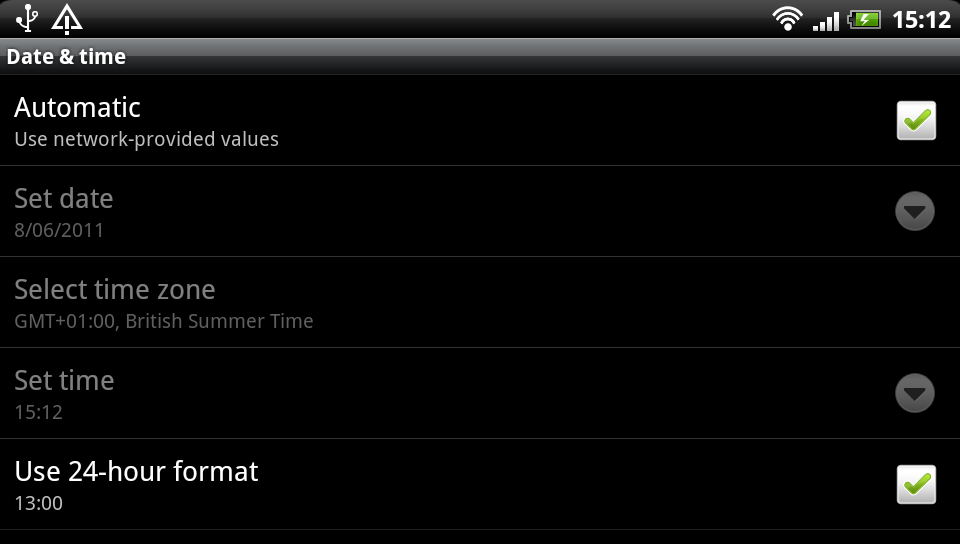
A bit of investigation reveals that when you enable ‘Automatic: use network-provided values’ in the Date & time settings the device makes a connection to one of a list of public NIST time servers and then updates its own time using the ancient Daytime Protocol.

All good so far, well done HTC.

A bit more playing with the clock revealed something else intriguing going on when the clock is manually altered. The device makes a separate HTTP connection to primary.sdstime.sdgtl.net. Now who are they?

The SDGTL.NET domain is registered to Saffron Digital Ltd in London. The very same Saffron Digital who have been recently bought out by HTC.

The HTTP request contains a client-generated nonce value along with the user-agent com.sdgtl.sectime – which also includes the device model number details and a ‘fingerprint’ value.

The response from the remote server is a XML getTimeResponse payload which contains the current Unix Epoch time and a digital signature.

So why does the device need this and why are HTC so concerned that you are manually changing the clock? My guess is that this is is being triggered by an embedded DRM service, perhaps related to Saffron Digital’s video service.

The Proprietary Internet

When I started my career working at a fledgling ISP I fondly remember the great excitement of seeing email addresses and URLs first appear on advertising billboards and TV. My hitherto secret world of email, newsgroups and (latterly) web sites was no longer restricted to the techie community and was gaining widespread public adoption.

After a while people didn’t look at me with puzzled expressions when I spoke about my work, and instead they wanted to learn more about this new World Wide Web thing and the odd @ / symbols that were spreading like wildfire in the conventional media.

I felt a sense of pride that we were all working together on a global infrastructure with open standards and unfettered access to content.

That was in 1992 and since then a lot has changed online. I don’t need to go into that.

What I’ve been experiencing in the last couple of years with proprietary and closed social networks is disturbing and quite contrary to the original Internet ethos of sharing and collaboration.

The biggest culprit of what I am complaining about is Facebook.
I do not have a Facebook account, nor do I want one. I know who my real friends are, I’m not interested in resuming contact with forgotten acquaintances and I don’t feel the need to collect new ‘friends’ like a virtual Panini sticker album.

Aside from Facebook just not being relevant to me or my daily life, I don’t want to share my personal details with any more organisations that I don’t trust.

So what’s the problem then? I don’t need Facebook and Facebook doesn’t need me.

My problem is that just like I saw email addresses and web URLs go mainstream, I now see facebook.com links instead.

Instead of feeling excited about exploring these products and brands online, I now feel excluded.

Every time I see a facebook.com address instead of a regular company domain name it’s another nail in the coffin of the open and inclusive Internet that I helped to build.

So why this post? It’s a plea to everyone to pull your content from Facebook and embrace the open Internet instead. You’re reading my views right now without registration, so why should I be forced to divulge my personal details and commodify myself just to view yours?
iCloud Legal Information

Logging into iTunes Connect today I was unexpectedly greeted with this message:


I’m still looking for the ‘What does this question even mean?’ option.

I dread to think what might happen if I dare to answer Yes!

Configure exim4 to use an O2 mail relay

To configure exim4 to use O2’s SMTP server for outbound mail:

(As root) edit /etc/exim4/passwd.client and add your O2 portal authentication credentials.

See ‘man exim4_passwd_client’ for how exim4 parses this file.

Note that smtp.o2.co.uk resolves to the IP address 82.132.141.69, but the reverse DNS for that IP address resolves to mail.o2.co.uk, so you will need to use that name in passwd.client.

The line in passwd.client should look something like this:

mail.o2.co.uk:yourname@o2.co.uk:your_password

O2’s mail servers don’t support TLS so you will need to add the following line to /etc/exim4/exim4.conf.localmacros (just create the file if it doesn’t exist already)

AUTH_CLIENT_ALLOW_NOTLS_PASSWORDS = true

This allows passwords to be sent over an insecure connection. It’s far from ideal but nothing can be done until O2 supports TLS.

Finally run ‘dpkg-reconfigure exim4-config’ to update the mail server configuration.

Select ‘mail sent by smarthost; received via SMTP or fetchmail‘ and when it asks for the smarthost address use smtp.o2.co.uk.

You should now be sending email using O2’s smarthost.

Check /var/log/exim4/mainlog when sending mail to confirm that everything is OK.