Apple AirPort trusted networks list

I was tearing my hair out trying to understand why my MacBook repeatedly joined a WiFi network, despite my removing the SSID from the preferred networks list and deleting the AirPort network password from the System Keychain. I was attempting to force my MacBook to only associate with the 5GHz version of a WiFi network (on an Airport Extreme Base Station), but no matter what I did I would find that the MacBook occasionally reverted to associating with the original 2GHz SSID again.

The mystery was solved with the discovery that as well as the WiFi Preferred Networks list, there is a hidden trusted networks list buried deep within Mac OS X. Even if you remove a network SSID from the visible lists, your MacBook can still silently associate with previously saved networks.

Mac OS X retains WiFi network information and authentication credentials in the com.apple.airport.preferences.plist file which is located in the /Library/Preferences/SystemConfiguration folder.

To remove WiFi networks, either delete the individual networks from the KnownNetworks key using Property List Editor, or delete the file altogether and allow AirPort to rebuild it. It’s probably a good idea to turn AirPort off before editing the file.

There is an old Apple knowledge base article – AirPort: How to reset the trusted networks list – which also describes this.

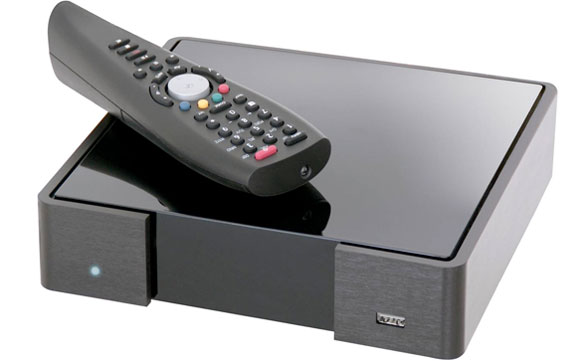
Technika Smartbox 8320HD software builds

Software Update

Here’s a list of the software updates for the Technika Smartbox 8320HD and the bugs addressed in each build.

v4.7.47-10 (04/05/2010)

Launch build. IP Vision claim this was “an incorrect software version” installed due to “an error in the manufacturing process” – yeah, right!

v4.7.48-08 (07/06/2010)

  • the issue of loss of audio while playing back recorded HD programmes or timeshifted HD programmes will be resolved
  • when the SmartBox is in lower-power standby, the internal fan will be stopped

v4.7.48-09 (08/06/2010)

  • an issue with the remote control sensitivity (auto repeat too quick)

v4.7.48-11 (10/06/2010)

  • OK key show INFO bar rather than toggle pause/play

v4.7.48-16 (21/06/2010)

  • Pause key allows video to be paused (timeshift and video player)
  • PiP key shows last viewed channel and allows switching back to it
  • Improvements to recordings management and playback when handling multiple recordings
  • New “recordings todo” list to list upcoming scheduled recordings and series linking

    Technika Smartbox 8320HD

    Here’s the low down on the new Technika Smartbox 8320HD sold exclusively by Tesco.

    The box is made by IP Vision (UK), the company behind the Fetch TV service brand. The hardware technology inside the box is based on the Netbox N8000 series of digital set top boxes from Netgem.

    Below are some problems I have encountered to date and recommended solutions:

    How do I use the Smartbox 8320HD with a Logitech Harmony universal remote control?

    • In the Logitech Harmony Remote Software choose Cable/Satellite Box > Digital Set Top Box > Manufacturer: Netgem > Model: N-7680

    Problems with the remote control skipping two lines at a time when you use the navigation buttons?

    • If you have a Harmony remote, go into the Logitech Harmony Remote Software and select the Netgem device, then ‘Troubleshoot’ > ‘Netgem responds to some commands either too many times or only occasionally’ > ‘0’

    The message “This programme requires HDCP, but your HDTV doesn’t seem to support it” appears on the TV screen when attempting to view HD channels:

    • Power off the Smartbox and all devices connected to it, including the TV and any intermediate A/V equipment connected via HDMI. Power them all back on again after a couple of minutes.

    Smartbox goes into standby mode every night, even when ‘Screensaver timeout’, ‘Auto standby delay’ and ‘Energy savings delay’ are all set to ‘disabled’ in the display preferences:

    • Response from FetchTV support 17/06/2010 – “Unfortunately it is not possible to stop the box from going into stand-by mode whilst it is not in use.”

    Will I be keeping my Smartbox? Well surprisingly yes I think I will. Despite the bugs and multiple software updates, this box has the potential to be rather great. The integration of iPlayer and SkyPlayer is slick and for the money and features there is nothing to compare with it.

    UPDATES:

    • The problem with the remote control has been addressed in the v4.7.48-09 software.
    • Tesco have withdrawn the 8320HD from sale

    Migrating from iPhone to Android

    It is possible to migrate from iPhone to an Android device and not miss out on all those ‘fantastic’ apps that Apple would have you believe are only available on the iPhone platform.

    Below is a list of my favourite apps that are available on both platforms:

    • Google Maps (but Android version also includes Navigation) [Google Inc.]
    • Google Earth [Google Inc.]
    • Dropbox [Dropbox, Inc.]
    • Evernote [Evernote Corp.]
    • Ocado [Ocado Technology]
    • Shazam [Shazam Entertainment Limited]
    • Sky News [BSkyB]
    • Twitter [Twitter, Inc.]
    • WordPress [Automattic, Inc.]

    Here is my list of alternative apps where a direct Android port is not yet available:

    • Seesmic (I chose this over the official Twitter app as it supports multiple accounts) ~ Tweetie
    • Where’s My Droid [alienmanfc6] ~ MobileMe Find My iPhone
    • Record It [Austin Reid] ~ Sky+
    • Pkt Auctions eBay [Bonfire Media, Inc.] ~ eBay Mobile
    • Astrid Task/Todo List [Todoroo Inc.] ~ Todo
    • PicSay Pro [Shinycore] ~ Cropulator
    • Squeeze Commander [flattermann, Chr. Erpelding] ~ IPeng
    • Fring [fring] ~ Skype
    • National Rail [croworc] ~ National Rail Enquiries
    • Barcode Scanner [ZXing Team] ~ Red Laser

    How about some apps that are only available on the Android platform?

    • RingScheduler [CellAvant, Inc.]
    • Handcent SMS [handcent_admin]
    • Sipdroid VoIP [i-p-tel GmbH]
    • LED Light [picolyl]
    • beebPlayer [David Johnston]
    • Astro File Manager [Metago]
    • BatteryTime Lite [Motalen]
    • Wifi Analyzer [farproc]

    What else is great about the freedom of Android?

    • Widgets! – active content on your home screen(s), this is a genuine game changer
    • Printing via Bluetooth to a Polaroid Pogo photo printer
    • Choosing any notification sound I like (not the small selection that Steve Jobs approves)
    • Not paying £59/year for MobileMe

    Do I miss my iPhone? Not a jot. I have been using an iPhone for nearly three years solid, so that really surprises me. After a few weeks of using an Android 2.1 device the iPhone looks and feels antiquated. Will the much heralded iPhone OS 4.0 bring iPhone back level again? From what I’ve seen so far, I don’t believe so. If I were Steve Jobs, I would be a worried man.

    Fedora 12 hangs during large file transfers

    Burning Fedora

    Ever since I replaced a Belkin network switch with a new D-Link DGS-1216T gigabit switch my Fedora server has been crashing when copying large files to it using Samba or Secure FTP. There was nothing in the log files or console messages to suggest the cause, so I scoured blogs and forums for answers. What I discovered is that I am certainly not the only person suffering from system crashes during large file transfers on Fedora 12. The most common suggestion for is to disable ‘scatter-gather’ in the ethernet card settings (ethtool -K eth0 sg off), but this did not address the problem in my case.

    I suspect there is a bug in the Linux sky2 ethernet driver for the Marvell 88E8057 NIC, which is embedded on my Shuttle SA76G2 XPC barebone. Quick solution – disable the onboard Marvell NIC and install an Intel Gigabit PRO/1000CT PCIe adapter which uses the e1000e driver.

    Since installing the new Intel NIC I’ve not experienced a single lock-up so far. This is unfortunately just the latest example of Fedora costing me money to work around the instabilities of supposedly supported hardware.