Mac OS X Lion and legacy SMB

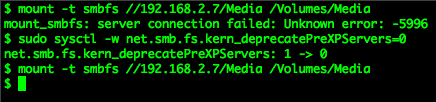
mount_smbfs: server connection failed: Unknown error: -5996

For anyone else experiencing problems connecting to older Windows networking shares (using SMB/CIFS protocols) from OS X Lion hosts, here is why and what to do about it.

For many years Mac OS X included the Open Source Samba client, but from OS X 10.7 onwards this was replaced by Apple’s own Windows networking software. In making this change Apple also chose to disable support for the older SMB 1.0 protocol, which some file sharing devices still depend on.

If you cannot connect your Mac to a network storage device, then try this command which temporarily resurrects support for the older SMB 1.0 protocol:

sudo sysctl -w net.smb.fs.kern_deprecatePreXPServers=0

Note that this is a transient kernel fix which will revert back when you reboot your Mac.

Unfortunately I’ve heard that this option no longer works in OS X Mountain Lion (10.8), so if you can’t update your legacy storage device to support SMB 2.0 then you had better not upgrade!

(Apple support article HT4697 also describes this issue)

Twitter journalism

I’ve ranted previously about shoddy BBC journalism, more recently I’ve seen more examples of what I term Twitter journalism. The worst protagonist for cultivating this drivel is Daily Mail Online, but that’s their raison d’être and absurd sensationalism is what you expect when you visit their site.

It’s sad to see the scourge of Twitter journalism now creeping insidiously into BBC News. There’s no better example than this article on BBC News: HD signal ‘lost’ during Wimbledon

That looks interesting I thought, surely as lead broadcaster the BBC would be the most dependable news organisation to go to for the low-down.

How wrong could I be! Never have I seen such a moronic and baseless article, totally devoid of facts or informative content.

It starts well enough:

Viewers watching Andy Murray and David Ferrer’s Wimbledon quarter final clash missed vital seconds of the match as BBC One HD went off the air.

So what was the cause?

“It was down on Sky [and] Freeview,” said one viewer on Twitter. “Sky had a very basic fault message on a black background. Freeview was just black.”

You’ve just told us that. We don’t need it reiterating by a random faceless quote.

But the match was still available on the BBC’s standard definition channel. Dozens of people complained about the loss of picture on social media sites.

Yes yes, I understand that people were rightly upset about the break in transmission. So what actually happened?

“Who’s stolen BBC HD?” asked Neil Sculley on Twitter.

“When will the HD return?” added Richard M. “It’s been about 20 mins and no announcement.”

No factual news content here, just a few questions scraped up from Twitter. I’m still none the wiser.

Some viewers reported that when the picture did return, it was a standard definition picture, not HD.

But, by 18:00, normal service appeared to have been restored.

“Appeared”? In case you hadn’t noticed, you work for the BBC. Wasn’t there someone in the internal directory you could ask?

“Panic over, HD resumed on BBC,” said Jamie Grace.

“Murray is now even uglier and angrier than normal.”

So the official confirmation of service being resumed was another comment on Twitter?

It’s no wonder the author of this ‘article’ hasn’t dared put their name to it.

Shame on you BBC.
Cookie Monster

On visiting the web site of The Royal Borough of Windsor & Maidenhead you are greeted with this message:

To which if you respond that you don’t consent to receiving cookies you get this message:

What part of “No, I don’t consent to receiving cookies” do they not understand?!

Gmail window in Safari

I like to have a separate Safari browser window for Gmail sessions, without the Safari toolbar or bookmarks bar.

It’s a bit of a pain to set this up each time the browser is reset, so here’s a handy tip for creating a bookmarklet which opens Gmail in an uncluttered window of its own:

javascript:window.open("http://gmail.com/","gmail","titlebar=0");

Save this bookmarklet to the first position in your personal bookmarks bar and you can also access it using the shortcut key Command+1.

EvoCam vs SecuritySpy

The options for network camera recording software are a bit limited on Mac OS. The two most popular products in this space are Evological’s EvoCam and Bensoftware’s SecuritySpy.

So which is best?

On price alone you might be tempted by EvoCam as it costs just $30 (under £20) for an unlimited number of cameras, while SecuritySpy will set you back £30 for a single camera license and a whopping £500 for unlimited camera support.

I’ve had an opportunity to evaluate both products and have come to the conclusion that you really do get what you pay for.

EvoCam does the job well enough and has a more polished user interface, but it also suffers from a major problem that lets it down badly, almost to the point of being unusable. For reasons unknown it ties up the processor for even a simple one camera recording setup.

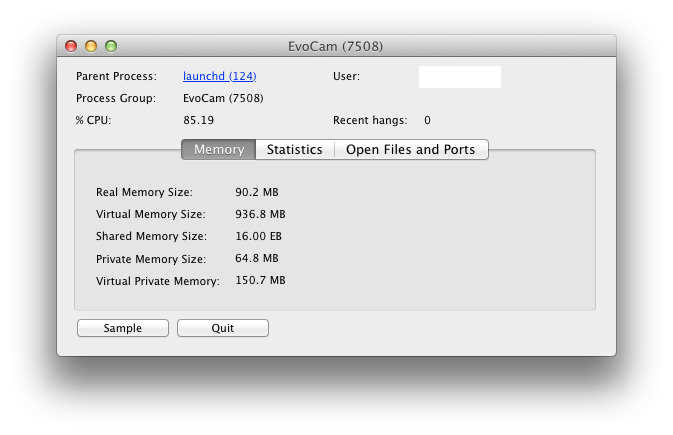
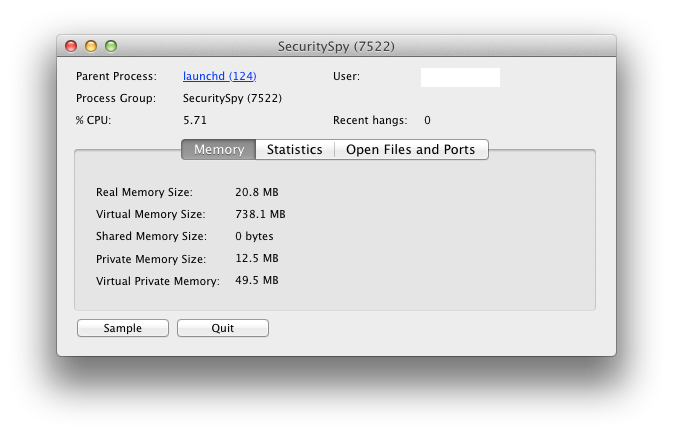
Activity Monitor output taken for identical recording sessions is below:

In these examples (from a Mac Mini 2.26GHz Intel Core 2 Duo with 4GB RAM), EvoCam consumes 85% CPU and 90MB real memory, while in comparison SecuritySpy consumes a meagre 6% CPU and 21MB real memory. That’s quite a difference and it’s very noticeable when you try to use the same host machine for other work.

So if you have the luxury of a dedicated powerful server for your camera recording then EvoCam is probably the most cost effective option, but if you want something that works reliably and doesn’t take over your machine then SecuritySpy is well worth the extra investment.