"Just avoid holding it in that way"

Those were the words of advice offered by Apple CEO Steve Jobs to a customer who emailed Jobs after experiencing antenna performance issues with his new iPhone 4 purchase.

What’s going on Apple?

When the original iPhone went on sale in June 2007 it changed the mobile industry overnight. This is not an overstatement. The traditional mobile handset manufacturers had become lazy and lethargic, churning out what was essentially the same product year after year with minor tweaks and trendy colour variants. Apple’s original iPhone product was nothing short of revolutionary in terms of user interface, style and engineering.

Apple were allowed to capitalise on their advancements because lazy handset vendors were unprepared and unable to react quickly enough. Many attempts were made to duplicate iPhone’s innovative touch screen user interface, most notably the much heralded Palm Pre, but none of them could claim to be a success. But that was then.

It took another relative newbie to the world of mobile devices to mount a serious challenge to Apple’s dominance – and that was the mighty Google. While Apple was content with making minor improvements to their devices, Google was plotting a revolution of their own.

Step up Google’s Android platform. Android has slowly gained momentum and adoption in the smartphone marketplace and recent handsets such as HTC’s Desire have finally become a credible alternative to iPhone.

Some would argue that Android’s capabilities have actually surpassed those of iOS (the new name for iPhone’s operating system). Credit for that in part is due to the decision to release Android as Open Source, while iOS has remained proprietary and tightly controlled by Apple – much to the chagrin of mobile application developers. In the first quarter of 2010 Android devices outsold Apple for the first time – and by quite some margin. Apple’s reaction was to sue HTC.
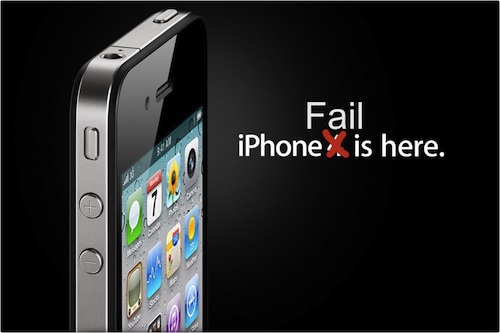
iPhone 4 Fail

So what of iPhone 4? Apple are in the unusual position of playing catch-up but this latest addition to the iPhone line up has failed to impress. Apple’s marketing campaign for iPhone 4 claims “This changes everything. Again.” Something has definitely changed, but not in a good way.

One day after the official iPhone 4 launch and customers are already complaining of poor antenna performance, yellow tinted displays and the ease of accidentally smashing iPhone’s “ultradurable” aluminosilicate glass panels. These problems would ordinarily have been identified during pre-release testing, but Apple’s paranoia dictates that test devices cannot be used without their protective plastic shroud and so early adopters have unwittingly become iPhone 4’s beta testers. There are parallels here with Microsoft’s old approach to product development, this is not something that Apple consumers are used to.

Customers forgave the original iPhone for its idiosyncrasies, restrictive capabilities and lack of features because it was something very special. Now there are many new mobile handsets that can justifiably claim to be special. iPhone 4 and the iOS 4 software update have brought iPhone up to a comparable specification level, but iPhone has lost its crown as the undisputed smartphone champion and the next generation are snapping at its heels.


Apple AirPort trusted networks list

I was tearing my hair out trying to understand why my MacBook repeatedly joined a WiFi network, despite my removing the SSID from the preferred networks list and deleting the AirPort network password from the System Keychain. I was attempting to force my MacBook to only associate with the 5GHz version of a WiFi network (on an Airport Extreme Base Station), but no matter what I did I would find that the MacBook occasionally reverted to associating with the original 2GHz SSID again.

The mystery was solved with the discovery that as well as the WiFi Preferred Networks list, there is a hidden trusted networks list buried deep within Mac OS X. Even if you remove a network SSID from the visible lists, your MacBook can still silently associate with previously saved networks.

Mac OS X retains WiFi network information and authentication credentials in the com.apple.airport.preferences.plist file which is located in the /Library/Preferences/SystemConfiguration folder.

To remove WiFi networks, either delete the individual networks from the KnownNetworks key using Property List Editor, or delete the file altogether and allow AirPort to rebuild it. It’s probably a good idea to turn AirPort off before editing the file.

There is an old Apple knowledge base article – AirPort: How to reset the trusted networks list – which also describes this.

Green is Bad – at least where WD disks are concerned

I don’t have much luck choosing hard disks – see The Seagate fiasco

Having replaced all the dodgy Seagate disks in my RAID array with new Western Digital Caviar Green (WD6400AADS) drives in February, I have already stumbled upon a big new problem.

It would appear that these Caviar Green disks achieve some of their stated green-ness by using a ‘clever’ energy saving system which automatically parks the hard disk heads (moving them off the platters) if the disk has been idle for over 8 seconds. This apparently reduces aerodynamic drag while the platters are spinning and achieves some microscopic power savings.


According to the published WD Caviar Green spec sheet, the disks are rated for 300,000 of these head load/unload cycles during the warranted lifetime of the disk. I checked how many load/unload cycles my new disks had performed so far in their short 1,840 hours (76 days) of life and gasped at what I saw – 234,000 !

My disks had consumed 78% of their rated load/unload cycles in just over two months of usage! Why was this happening?

Some quick investigation revealed that this is due in some part to my using the disks in a Linux system and has been exacerbated by including them in a RAID array. I calculated that on average the disk heads have been loading and unloading every 30 seconds since I first started using them. That would mean an expected life span of just over 100 days 😯

I needed a solution – and quick. WD are not oblivious to this issue, but have not exactly been forthcoming in their marketing material to bring this to your attention. They have however published a knowledge base article – In Linux the S.M.A.R.T Attribute 193 Load/Unload counter keeps increasing on a SATA 2 hard drive – which states the following:

WD drives are designed to reduce power consumption, in part by positioning the heads in a park position (unloading the heads) and turning off unnecessary electronics, resulting in substantial power savings. WD defines this mode as Idle 3.

Some utilities, operating systems, and applications, such as some implementations of Linux, for example, are not optimized for low power storage devices and can cause our drives to wake up at a higher rate than normal. This effectively negates the power-saving advantages of low-power drives, such as WD GreenPower™ models, and artificially increases the number of load-unload cycles. Although the increase in load/unload cycles is within design margins (drive has been validated to 1 million load/unload cycles without issue) a balance between life of product, logging requirements, and low power consumption can be achieved depending on what is critical to the system. Present SMART normalized values have not been re-normalized to 1 million cycles so advisory reporting on this attribute does not mean failure of product.

WD also released a MS-DOS software tool called WDIDLE3.EXE which can be used to disable the idle mode feature altogether – RE2GP Idle Mode Update Utility (backup mirror site)

This firmware modifies the behavior of the drive to wait longer before positioning the heads in their park position and turning off unnecessary electronics.

It’s not exactly plain sailing to use this tool, particularly if you are running Linux. I found the simplest route was to copy the utility to the DOSAPPS directory of an Ultimate Boot CD, rebuild the ISO image, boot off it into FreeDOS and run it from there. After executing wdidle3.exe /d I saw the good news that “Idle3 Timer is disabled” on all disks and the Load_Cycle_Count counter has been permanently halted *phew*

I have hopefully saved my disks from an early demise but I fear that the amount of overuse they have suffered already may have caused permanent wear damage. I guess only time will tell.

How to permanently delete a Facebook account


It would seem that following the ‘deactivate account’ link in Facebook does not actually delete your account or remove your profile. Your account just goes into a limbo state and is automatically reactivated if you log in again.

If you want to permanently delete your Facebook account, follow this link to http://www.facebook.com/help/contact.php?show_form=delete_account

After submitting the form you should receive a confirmation email like this:

Subject: Account Scheduled for Deletion

Hi Victor,

We have received a request to permanently delete your account. Your account has been deactivated from the site and will be permanently deleted within 14 days.

If you did not request to permanently delete your account, follow this link to cancel this request:

http://www.facebook.com/account_delete.php

Thanks,

The Facebook Team

As long as you do not log into your Facebook account again with two weeks then your account will be permanently deleted.

Update: Have a read of Gizmodo’s Top Ten Reasons You Should Quit Facebook if you weren’t convinced already.

The Seagate fiasco

In July 2008 I purchased two Seagate Barracuda ST3500320AS 500GB hard disks. One started reporting a high (and growing) number of unreadable/unrecoverable sectors and so I returned it for a warranty replacement. A couple of weeks later the second drive started doing the same.

A few months after that I started to see forum posts and reports from other Seagate customers reporting defective and dead drives, all of the same type and age. This soon turned into a flood of complaints on the Seagate community support forum and the IT press picked up the story.

» Seagate Forum: Official st31000340as 1TB barracuda epic fail thread

» TheRegister: Seagate customers swamped by Barracuda drive failures

» Engadget: Seagate Barracuda 7200.11 drives said to be failing at an alarming rate

On 18th January 2009 Seagate responded officially and acknowledged that there were firmware issues with some drives.

Smokin' Seagate

A number of Seagate hard drives from the following families may become inaccessible when the host system is powered on:

Barracuda 7200.11
DiamondMax 22
Barracuda ES.2 SATA

Once a drive has become affected the data becomes inaccessible to users but the data is not deleted.  Seagate has isolated this issue to a firmware bug affecting drives from these families manufactured in December 2008.

Please use the following tools and instructions to determine if you have one of the affected products.  If your drive is affected, we recommend that you update the firmware on the disk drive to prevent this condition.

(Note the incorrect “firmware bug affecting drives … manufactured in December 2008”, when they should have said “through to December 2008”).

Seagate released firmware update ‘SD1A’  for the affected drives. This first version of their updater software failed to recognise some of the affected drives and would not update them.

In response to customer complaints Seagate then released an updated-update the next day, with the same SD1A version number.

Note: This file has been updated as of Jan 19, 2008 4:15PM CST. Please re-download this if you have an earlier version.

This update caused the BIOS of some PCs to stop detecting the 500GB capacity drives, rendering them unusable. Well done Seagate!

» Seagate Forum: Does the SD1A break 500GB cudas?

Seagate removed the download link and then finally on 21st January 2009 released an updated-updated-update, yet again with the same version number SD1A.

Could they possibly be any more incompetent in dealing with an already bad situation?

I gather the final version of the SD1A update is safe to use, I haven’t tried it for myself as I opted to purchase new Western Digital Caviar drives and migrate all my data to them instead.

Seagate later decided to close all the forum threads about this issue and “consolidate” them into a new thread:

Hello:

To consolidate the discussion regarding the Seagate Barracuda 7200.11 Firmware issues, please post all related messages in the new thread that we have begun for the purpose of centering all the discussion in one place. Please do not post firmware-related content in another thread. We are closing this thread to redirect.

Thank you for your understanding!

-The Moderator Team

Try clicking on the link and see what you get!

The message you are trying to access has been deleted. Please update your bookmarks.

Great customer support Seagate!