Squeezebox Receiver without a controller

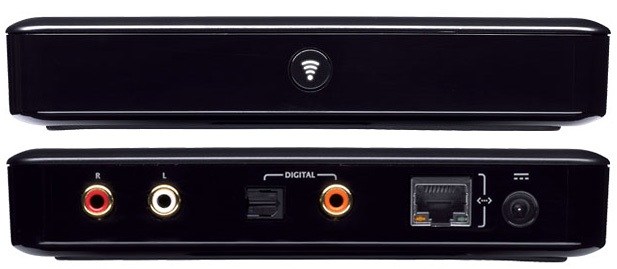
It is indeed possible to setup a standalone Logitech Squeezebox (Duet) media receiver without needing to fork out for the controller. To be frank there are much better (and cheaper) controller software solutions out there for iOS and Android, but an extra Squeezebox receiver can be very handy.

The Squeezebox receiver can currently be picked up for just shy of £80 from Superfi – inclusive of VAT and delivery!

Once you’ve got your receiver you’ll need to configure it with an IP address and server information. Usually this would be done via the controller, but thanks to Robin Bowes you can use his Net::UDAP Perl module to do it all from a PC or Mac.

As long as you’re comfortable using the command line and Perl, you will find the udap_shell.pl script very simple to use and be up and running within minutes.

Microsoft, what’s my MAC address?

Using MAC address filtering to add an extra layer of security to your WiFi network?

Need to know the MAC address of your shiny new Windows Phone 7 device?

You’re out of luck!

There is a rather illuminating discussion on Microsoft Answers – MAC address for WP7 Devices – that sheds light on the issue…

A WP7 customer asks:

I wanted to connect my WP7 device to my home WiFi. However, I will need to know the MAC address of the WP7 before I can connect.

Can anyone let me know where to get it?

Johan van Mierlo (a Microsoft MVP Windows Phone Specialist) replies with:

Yup, they only way is to make sure your wireless network is visible, connect with WEP or other security and afterward make your network invisible again.

Another couple of customers comment:

seems like microsoft just “forgot” to implement that…

I cannot believe this was missed..

My thoughts exactly.

Microsoft, are you for real? You don’t exactly have a great track record when it comes to security and the only way of obtaining the WiFi MAC address of a WP7 device is to disable security?

A leopard never changes its spots!

Squeezebox Server on a budget

Looking for an inexpensive, quiet and low-power Squeezebox Server?

The O2 Joggler is a rebadged version of a OpenPeak OpenFrame 7″ touch-screen device. It has an Intel Atom Z520 CPU running at 1.3Ghz, 512Mb of RAM and 1GB of internal flash storage. You can also run it as a fully functioning Squeezebox Server!

Here’s how:

  • First check that your Joggler is running the latest 26635.S3 (Jun 25 2010) software, if it’s not then update
  • You will need telnet access, so download this Joggler telnet hack
  • Unpack the Zip archive to the root of a USB stick formatted in FAT16 or FAT32
  • Unplug the Joggler, insert the USB stick, then power on again and wait!
  • When the Joggler reboots it will have telnet enabled 🙂
  • Telnet to the IP address of your Joggler and login with the username ‘letmein’
  • Download Logitech’s Squeezebox Server v7.5.1 and save to your PC desktop

Now use these commands to download and install flipflip’s Squeezebox server wrapper:

cd /media
mkdir /media/ssods4 /opt
ln -s /media/ssods4 /opt/ssods4
cd /opt/ssods4
wget http://oinkzwurgl.org/downloads/ssods/ssods-4.9.1-i686.tar.gz
tar -xzvpf ssods-4.9.1-i686.tar.gz
echo "ssods:*:1000:1000:ssods:/opt/ssods4:" >> /etc/passwd
echo "ssods:*:1000:" >> /etc/group
LC_ALL= /opt/ssods4/etc/init.d/rc.ssods start

Assuming all the above has gone ok, you can now open a browser and finish the Squeezebox server installation:

  • Open a web browser on your PC and enter the URL of your Joggler, e.g. http://192.168.1.65:9099/
  • Follow the instructions in SSOXX to upload the squeezeboxserver-7.5.1.tgz file you downloaded earlier and then install the SqueezeCenter tar ball
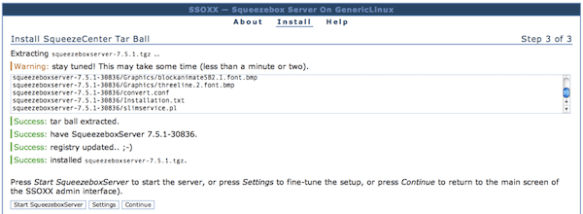
  • When it’s finished you should see Success messages like the screenshot below
  • Now just click on ‘Start SqueezeboxServer’ to fire it up
If you are going to use your Joggler as a dedicated Squeezebox Server then you might want to make the following tweaks to ensure that it all starts up automatically and unnecessary processes are disabled:

  • Edit  /etc/init.d/boot.d/S99boot.hacks and add the line ‘LC_ALL= /opt/ssods4/etc/init.d/rc.ssods start’ in the starthacks() function, just after the telnetd line should be fine (my S99boot.hacks additions are at the end of this post)
  • Go into the SSOXX settings tab and make sure that autostart is enabled
  • Stop the X11 server and O2 GUI from loading by commenting out the following two lines from the end of /etc/init.d/rcS
cd /openpeak/tango
./run &
  • Disable automatic software updating to ensure that all your good work is not undone in the future:
echo "127.0.0.1 localhost applog.openpeak.net o2.openpeak.com o2.openpeak.co.uk" > /etc/hosts

I want to keep my Joggler in a cupboard and forget all about it, so I have no use for the display.
To save power I switch the screen off entirely, to do this I use Starter’s driver patches:

cd /media
wget http://get.intanet.com/dl/brightness.sh
wget http://get.intanet.com/dl/bp
./brightness.sh allowscreenoff 1
./brightness.sh negativevalues 1

Add the following line to /etc/init.d/boot.d/S99boot.hacks:

/bin/echo "-3">/proc/blctrl"

If you want to mount a Samba/CIFS share (like a NAS mount) you will need to download the cifs.ko kernel module and add that to the startup file.

The starthacks() function in my /etc/init.d/boot.d/S99boot.hacks startup file now looks like this:

starthacks()
{
  # enable telnet
  /usr/sbin/telnetd
  # load CIFS kernel module
  /sbin/insmod /media/cifs.ko
  /bin/sleep 2
  # mount network share
  /bin/mount -t cifs //192.168.1.2/musicshare /mnt/music -o user=music,password=secret
  /bin/sleep 2
  # disable screen
  /bin/echo "-3">/proc/blctrl
  # start SSOXX and Squeezebox Server
  LC_ALL= /opt/ssods4/etc/init.d/rc.ssods start
}

Reboot your Joggler for the display driver patches to load.
"Just avoid holding it in that way"

Those were the words of advice offered by Apple CEO Steve Jobs to a customer who emailed Jobs after experiencing antenna performance issues with his new iPhone 4 purchase.

What’s going on Apple?

When the original iPhone went on sale in June 2007 it changed the mobile industry overnight. This is not an overstatement. The traditional mobile handset manufacturers had become lazy and lethargic, churning out what was essentially the same product year after year with minor tweaks and trendy colour variants. Apple’s original iPhone product was nothing short of revolutionary in terms of user interface, style and engineering.

Apple were allowed to capitalise on their advancements because lazy handset vendors were unprepared and unable to react quickly enough. Many attempts were made to duplicate iPhone’s innovative touch screen user interface, most notably the much heralded Palm Pre, but none of them could claim to be a success. But that was then.

It took another relative newbie to the world of mobile devices to mount a serious challenge to Apple’s dominance – and that was the mighty Google. While Apple was content with making minor improvements to their devices, Google was plotting a revolution of their own.

Step up Google’s Android platform. Android has slowly gained momentum and adoption in the smartphone marketplace and recent handsets such as HTC’s Desire have finally become a credible alternative to iPhone.

Some would argue that Android’s capabilities have actually surpassed those of iOS (the new name for iPhone’s operating system). Credit for that in part is due to the decision to release Android as Open Source, while iOS has remained proprietary and tightly controlled by Apple – much to the chagrin of mobile application developers. In the first quarter of 2010 Android devices outsold Apple for the first time – and by quite some margin. Apple’s reaction was to sue HTC.

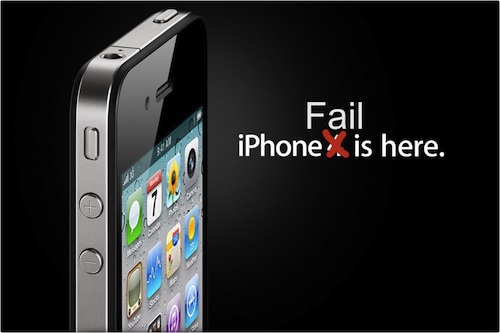
iPhone 4 Fail

So what of iPhone 4? Apple are in the unusual position of playing catch-up but this latest addition to the iPhone line up has failed to impress. Apple’s marketing campaign for iPhone 4 claims “This changes everything. Again.” Something has definitely changed, but not in a good way.

One day after the official iPhone 4 launch and customers are already complaining of poor antenna performance, yellow tinted displays and the ease of accidentally smashing iPhone’s “ultradurable” aluminosilicate glass panels. These problems would ordinarily have been identified during pre-release testing, but Apple’s paranoia dictates that test devices cannot be used without their protective plastic shroud and so early adopters have unwittingly become iPhone 4’s beta testers. There are parallels here with Microsoft’s old approach to product development, this is not something that Apple consumers are used to.

Customers forgave the original iPhone for its idiosyncrasies, restrictive capabilities and lack of features because it was something very special. Now there are many new mobile handsets that can justifiably claim to be special. iPhone 4 and the iOS 4 software update have brought iPhone up to a comparable specification level, but iPhone has lost its crown as the undisputed smartphone champion and the next generation are snapping at its heels.

BT eFrame 1000 dissected – part 1

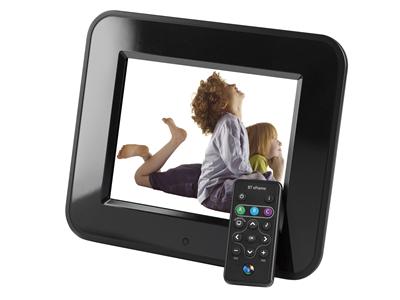
Having disposed of my Philips photo frame, I have purchased a BT eFrame 1000 wireless 8″ digital photo frame from dabs.com – for the remarkable price of £63.60.

The photo frame supports 802.11g Wi-Fi for file transfer which I am keen to give a try. As usual, the supplied management software will only run on Windows platforms (I tried Crossover on the Mac, but it doesn’t quite work). I sent a speculative email to the BT Product Helpdesk to enquire about the availability of technical specifications for the file transfer mechanism, however I have not received a response.

I then discovered from the CE Declaration of Conformity that the device is actually manufactured by Quanta Microsystems, Inc (QMI) and badged as BT. I read somewhere that QMI’s vanilla device supports the FrameChannel service but this feature has sadly been removed from the BT firmware. In an attempt to get my hands on the vanilla firmware I found a contact at QMI and pestered them for more information. They are staying tight-lipped and won’t divulge anything useful, so I am stuck without a solution for Mac OS or Linux.

Undeterred I am going to do it the hard way and embark on a mission to reverse engineer the proprietary protocols that control this device and hopefully open-up the full potential for non-Windoze users.

Wish me luck!